Why Trust Gadgetbyte?
At Gadgetbyte, we invest substantial hours into rigorously testing each product or service we review, guaranteeing that you make informed purchases. Learn more about our testing process.
Review Overview
4.3
Lenovo has done it again. The Legion 5 Pro Gen 7 ticks all the boxes a gaming laptop must in 2022. The latest AMD processors combined with good cooling, sturdy build quality, and a top-tier display make the gaming experience a delight. By no means is the laptop perfect, but it comes very close.
Design & Build
9/10
Display
10/10
Keyboard
9/10
Trackpad
8/10
Performance
9/10
Audio
8/10
Webcam
7/10
Battery
8/10
Value for Money
9/10
The Legion 5 Pro was one of the best gaming laptops on the market last year. Combining beefy hardware with a commendable design and a 16:10 screen, it quickly gained a special place in my heart. So, what’s it like this year? Does the new Legion 5 Pro live up to the legacy of its predecessor? Well, to nobody’s surprise the answer is yes. The Legion 5 Pro Gen 7 keeps everything great about the previous generation and improves on it. Aside from the generational updates, there are a few changes here and there. So, let's take a look at the Lenovo Legion 5 Pro (2022) in this full review.

Lenovo Legion 5 Pro (2022) Specifications:
- Design & Build: Plastic/anodized aluminum hybrid build, 359.9 x 262.4 x 19.9 mm, 2.49 kg
- Color Options: Storm Grey, Glacier White
- Display: 16″ anti-glare IPS panel, 165Hz refresh rate, 100% sRGB, 500 nits brightness, 178° viewing angle
- Display Properties: VESA HDR 400, Dolby Vision, Free-Sync, G-Sync, 3ms response time, DC dimmer, X-Rite Pantone factory color calibration
- Resolution: WQXGA (2560×1600) resolution, 16:10 aspect ratio
- Keyboard: Full-size backlit (4-zone RGB) keys
- Trackpad: Mylar surface (plastic) multi-touch trackpad, Windows Precision drivers
- Security: TPM 2.0 chip, No fingerprint sensor
- Processor: AMD Ryzen 7 6800H CPU, 8C/16T, 4.7GHz Max Turbo Frequency, 16MB L3 Cache, 6nm process, 45W TDP
- RAM: 16GB DDR5-4800MHz (2x 8GB), Up to 32GB
- Storage: 512GB M.2 PCIe 3.0 NVMe SSD (2x M.2 slots total)
- Graphics: NVIDIA GeForce RTX 3060 (140W), 6GB GDDR6 VRAM
- Audio: 2x 2W stereo speakers, Nahimic Audio
- Battery: 80 Watt-hours 4-cell Li-Po battery
- Power Supply: 300W slim tip (3-pin) AC power adapter
- Webcam: 720p HD camera, E-camera shutter, Dual-array microphones
- Connectivity: WiFi 6 (ax), Bluetooth 5.1
- I/O Ports: 3x USB 3.2 Gen 1 Type-A (1x Always On), 3x USB 3.2 Gen 2 Type-C (1x Power Delivery), 1x HDMI 2.1, 1x 3.5mm combo audio jack, 1x RJ45 (LAN), 1x power connector
- Price in Nepal: Rs. 220,000 (Ryzen 7 6800H, RTX 3060, 16GB RAM, 512GB SSD)
- What’s inside the box: Laptop, power adapter, quick start guide
Lenovo Legion 5 Pro (2022) Review:
Design & Build
- 19.9 x 359.9 x 262.4mm, 2.49 kg
- Plastic, anodized aluminum hybrid build quality
Okay, the first thing I want to talk about here is the design, since Lenovo has further simplified the looks of the Legion 5 Pro this time. While last year’s model featured a big glowing “Y” logo on the lid, this time it's replaced with a simple “Legion” text. The keyboard color also matches the body now, which adds to the flush minimal look of the device. That aside, it still has that same top-notch build quality that I like: the same TrueStrike keyboard, and the same build materials. For me, its build quality leaves no room for complaints and I think it is one of the best-looking gaming laptops out there.
Display
- 16″ anti-glare non-touch QHD IPS panel
- 165Hz refresh rate, 100% sRGB gamut
- VESA HDR 400, Dolby Vision compatible
Talking about formulas that work, the display isn’t that different this time either. And once again, I can’t help but be amazed by it! I mean, just look at its specs: a 16” QHD screen with a smooth 165Hz refresh rate, 3ms response time, and 500 nits brightness; all while boasting 100% sRGB gamut? Okay Lenovo, just take my money. Furthermore, there’s also a 240Hz option this time around.

Keyboard
- Backlit full-size keys (4-zone RGB)
Getting to the keyboard, our unit has 4-zone RGB lighting, whereas it is also available with a simple white backlight. On the other hand, there’s also the “Glacier White” version which looks quite elegant with its blue backlit keys.

Trackpad
And I was also expecting Lenovo to implement a glass trackpad this time, but I guess that was too much to ask for. While the Legion 7 lineup gets the glass trackpad treatment, Legion 5 Pro users are still stuck with the mylar plastic trackpad. By no means is this trackpad bad, but it simply cannot compete with the smoothness of a glass one.
Audio
- 2x 2W side-firing speakers
- Supports Nahimic audio
And this guy houses the same speaker setup as we’ve seen before as well, between the frame and the lower half of the laptop. Like the trackpad, these dual speakers are just okay for a gaming laptop. The bass feels recessed and the mids outshine everything else. After some tinkering in the Nahimic app, I was able to get a slightly immersive audio experience though.
Webcam
- 720p HD camera
- E-camera shutter

Performance
- AMD Ryzen 7 6800H CPU (45W TDP)
- NVIDIA RTX 3060 140W (discrete GPU)
- 16GB DDR5 RAM, 512GB PCIe NVMe SSD
Well, let’s now talk about the most important aspect of a gaming laptop, the performance! This year, you can pick up the Legion 5 Pro configured with an AMD Ryzen 5 6600H or a Ryzen 7 6800H. Lenovo has discontinued the usage of RTX 3050 here and the GPU options you have now include RTX 3060, 3070, and 3070 Ti. And my Legion 5 Pro is configured with the Ryzen 7 6800H CPU and NVIDIA’s RTX 3060 GPU with 140W TGP. Memory-wise, you’re looking at 16GB DDR5 RAM in dual-channel and 512GB of M.2 NVMe SSD. This particular model retails at NPR 235,000 here in Nepal and around INR 147,000 in India.

Gaming
Okay, let’s now talk about its gaming performance. Playing CS: GO at Very High settings, the Legion 5 Pro managed 317.7 fps on average with a 1% low of 100.7 fps. Strangely enough, this is higher than the TUF 15. Likewise, the Legion 5 pro easily sailed through GTA V and Borderlands 3 at High preset with over 100 fps on average. Hitman 3, on the other hand, yielded an average of 65.8 fps in Ultra settings. And similar to the TUF 15, I didn’t find any notable improvement when dropping the settings to medium.
| 1080p Gaming Benchmarks | |||
| Performance mode (power plugged in), VSync Off, DLSS Off | |||
| Game | Settings | Average FPS | |
| Legion 5 Pro (2022) | Asus TUF F15 (2022) | ||
| Cyberpunk 2077 | Texture quality: High | 32.8fps | 27.5fps |
| Ray Tracing: Ultra | |||
| Texture quality: Medium | 46.8fps | ||
| Ray Tracing: Medium | |||
| Control | Texture resolution: Ultra | 55.5fps | 48.3fps |
| Ray Tracing: High | |||
| GTA V | 1080p - DX11 - High | 143.8fps | 127.7fps |
| CS: GO | Texture Detail: High Anti-Aliasing: 8X MSAA | 317.7fps | 263.5fps |
| Borderlands 3 | 1080p - DX12 - Ultra | 99.4fps | 103.9fps |
| 1080p - DX12 - High | 123.2fps | 116.9fps | |
| Hitman 3 | Texture Quality: Ultra | 66.0fps | 65.8fps |
| Anti-Aliasing: 4X MSAA | |||
Playing Control on Ultra with ray tracing set to High was a decent experience with fps averaging at 55.5. Or 68.5 fps on Medium settings. On the other hand, CyberPunk 2077 is basically unplayable with just 32.8 fps on average on Ultra settings without DLSS. But you can get much better gameplay at Medium settings instead. And when turning off ray tracing completely, the Legion 5 pro averages at an impressive 102 fps.
Cooling
Okay, that brings me to the cooling side of things. Compared to its predecessor, Lenovo has significantly upgraded the cooling system this time, with what it calls “Coldfront 4.0”. It also claims that the fans are now 140% more powerful while the blades are 40% thinner too. It also has a dedicated copper block to further cool the CPU. And yes, the thermals here do live up to Lenovo's claims. Even after multiple sessions of gaming, putting my hands on the keyboard deck did not feel uneasy at all. I recorded a temperature of 45.5°C when playing CyberPunk 2077 on medium, where the heat was mostly localized to the area between the Enter and the power button. On the other hand, the temperature jumped up to 47.1°C after about 20 minutes into Hitman 3 on Ultra preset.
Quiet fans
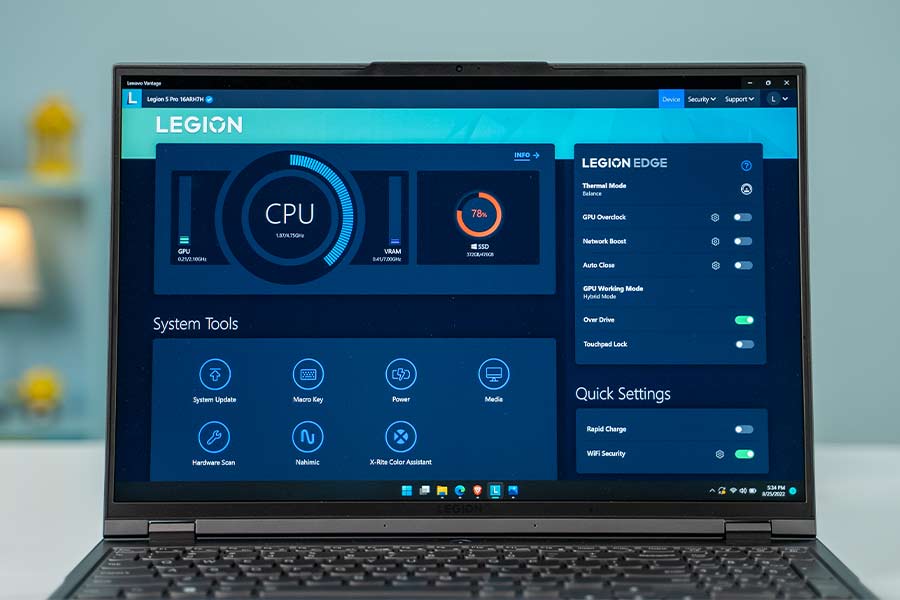
As for the fans, you will hear them only when the laptop goes through some CPU and GPU-intensive workload. Thus, I found myself using it in Performance mode most of the time. Oh, and a neat touch that Lenovo has added here is the color-coded notification light on the power button, so I can immediately tell if the laptop is running on performance, balance, or quiet mode.
Battery
- 80 Watt-hour 4-cell battery
- 300W AC power adapter
In terms of battery, this year’s Legion 5 Pro has the same 80Wh cell as its predecessor. But despite this, I was getting around one or two hours of additional screen-on time here. In my general usage, it lasted me 4 to 6 hours on average, with brightness set to 75% and enabling the Balanced power profile.


Lenovo Legion 5 Pro (2022) Review: Conclusion
Okay, let’s wrap up this review of the Lenovo Legion 5 Pro (2022). And it’s no surprise that the 2022 edition of Lenovo Legion 5 Pro gets a big seal of approval from me. Granted its AMD CPU is not as powerful as Intel’s 12th Gen processors, but the gains in terms of battery life and thermals are hard to overlook. Plus, it also has an incredible display and a solid build quality, which makes it an easy recommendation.

- Watch our video review of the Asus TUF Gaming F15 (2022)
Pros:
- Value for money
- Premium design
- Commendable performance improvements over the last generation
- Well-rounded port selection/placement
- One of the best 165Hz panels on a laptop
- 16:10 aspect ratio
- Excellent gaming performance
- Quiet Fans
- Improved battery life
Cons:
- No glass trackpad
- Oversized 300W power adapter
- Bad 720p webcam
Article Last updated: February 4, 2026

![Best Laptops to Buy in Nepal at Every Price Segment [Updated]](https://media.gadgetbytenepal.com/2025/11/Best-Laptops-to-Buy-in-Nepal-at-Every-Price-Segment-2025.jpg)