Why Trust Gadgetbyte?
At Gadgetbyte, we invest substantial hours into rigorously testing each product or service we review, guaranteeing that you make informed purchases. Learn more about our testing process.
Review Overview
4.1
Design and build
8.7/10
Display
8.2/10
Keyboard
8.9/10
Performance
8.3/10
Audio
7.9/10
Webcam
6.7/10
Battery
8.3/10
Value for money
7.8/10
The Nitro V 16S AI is the most underperforming gaming laptop in the Nitro Series, but it does hold its own in day-to-day use and medium-level gaming. However, the sheer price tag makes it hard to recommend when there are far better options at the same or even lower price points.
Today, we’ve got Acer’s newest slim gaming contender, the Nitro V 16S AI. The variant I have packs AMD’s Ryzen 7 260 chip paired with NVIDIA’s RTX 5050 graphics. The Nitro V 16S AI is generally considered a budget-friendly option in Acer’s gaming lineup, and, naturally, it falls behind in performance compared to the standard Nitro 16 and the other regular Nitro V 16 models. But is it really true? Let’s go further in-depth in this Acer Nitro V 16S AI review.

Acer Nitro V 16S AI (2025) Specifications
- Dimensions: 358 x 264 x 20 mm
- Weight: 2.1 kg
- Display: 16″ FHD+ IPS panel, 180Hz refresh rate, 100% sRGB colour gamut
- Processor: AMD Ryzen 7 260 “Hawk Point”
- 8C/16T, 5.1 GHz max turbo frequency
- Graphics: NVIDIA GeForce RTX 5050 (8GB GDDR7 VRAM, 85W TGP with Dynamic Boost)
- Memory: 16GB DDR5 RAM, 512GB PCIe Gen4 SSD
- Ports: 2x USB 3.2 Gen 2 Type-A, 1x USB 3.2 Gen 1 Type-A, 1x USB 4 Type-C, 1x HDMI 2.1, 1x LAN (RJ45), 1x 3.5mm combo audio jack, 1x microSD card reader
- Battery: Li-ion 76 Wh battery (Charges via a 135W Adapter)
- Webcam: 720p HD Camera
- Audio: Dual Speakers
- Keyboard: 4-zone RGB backlighting
- Touchpad: Windows Precision Touchpad
- Security: TPM 2.0 chip
Acer Nitro V 16S AI (2025) Review:
Design and build
- 358 x 264 x 20 mm, 2.1 kg
The moment I picked it up, the weight was the first thing I noticed. The Acer Nitro V 16S AI feels surprisingly light for a 16-inch laptop, even lighter than a 16-inch MacBook Pro, which has definitely made it easier to move around. I also liked the fact that it comes with a clean, straightforward design that looks good without trying too hard. The hinge was also quite good.
However, the one thing that I despise about this device is how instantly it attracts smudges. Even a quick touch on the lid leaves such a deep mark that it’s a hassle to wipe off. But aside from that, the overall build is solid and well-put-together.
Display
- 16-inch FHD+ (1920 x 1200) IPS panel
- 100% sRGB, 180Hz
- MUX Switch
The display looks good for an IPS panel and is comfortable on the eyes. Colors were vibrant, and the 16-inch screen provided ample workspace. FHD+ resolution isn’t ideal, but I guess it works for this slim laptop. The 180Hz refresh rate is also great to have, and it feels much smoother.
It also supports MUX Switch, which is very convenient for gaming, and nice to have if you frequently switch between gaming and less GPU-intensive work.
I ran a few tests, and it showed that the device covers 100% of sRGB, 74% of AdobeRGB, 75% of P3, and 69% of NTSC. It basically means it can show any standard web colors perfectly and most professional photo/video colors, but not the full range that higher-end laptops can. The color also appears natural, with the white points staying around 6500K and the brightness exceeding 400 nits, which is enough for indoor or outdoor use.
Keyboard and trackpad
- 4-zone RGB backlighting, Plastic trackpad
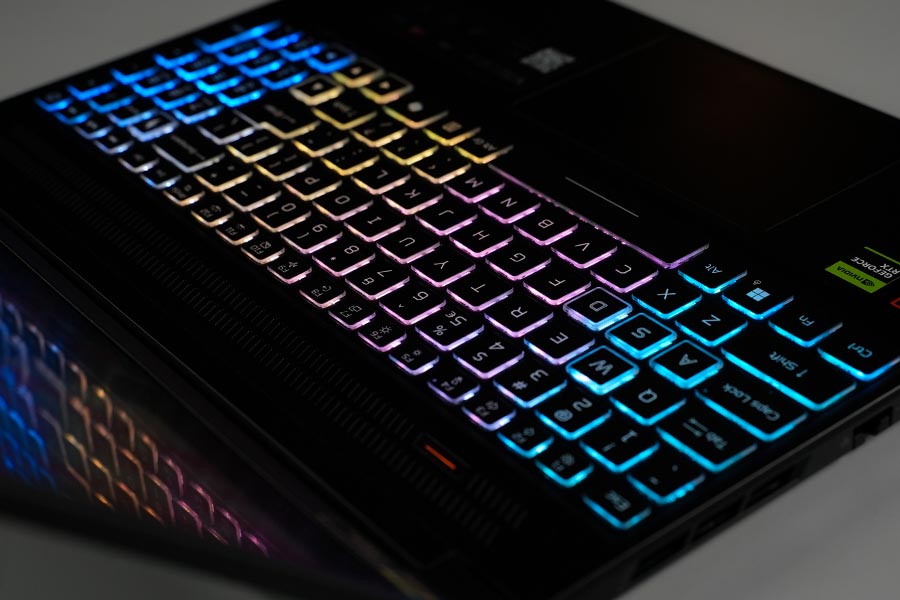
Typing on this keyboard feels surprisingly soft and quiet, almost silent. There is also the lock function key, which really comes in handy, something I personally find very useful. The keyboard also comes with 4-zone RGB lighting that can be fully customized through Acer’s NitroSense software, though I didn’t use it much.
The trackpad also feels decent for general use. It’s made of plastic, and while it usually works fine, it can feel a bit stiff when swiping with dry fingers. It’s alright, but not something you’d rely on for precision tasks.
Port Selection
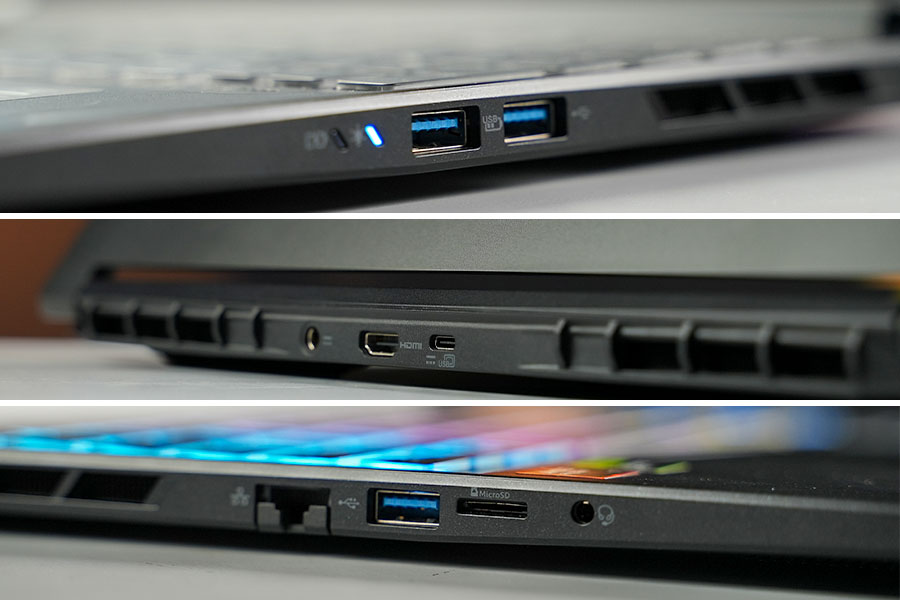
I like the port selection as well; it offers a solid mix of ports for everyday use. The three Type-A ports are enough for a mouse, keyboard, and any other peripherals. However, it has only one Type-C port at the back, and since this variant comes with an AMD processor, it isn’t Thunderbolt, as it was co-developed by Apple and Intel.
Other ports like LAN, HDMI, and 3.5 mm headphone jack are also nice to have. And the additional microSD card reader can be very handy for creators or photographers.
Webcam
- 720p FHD camera
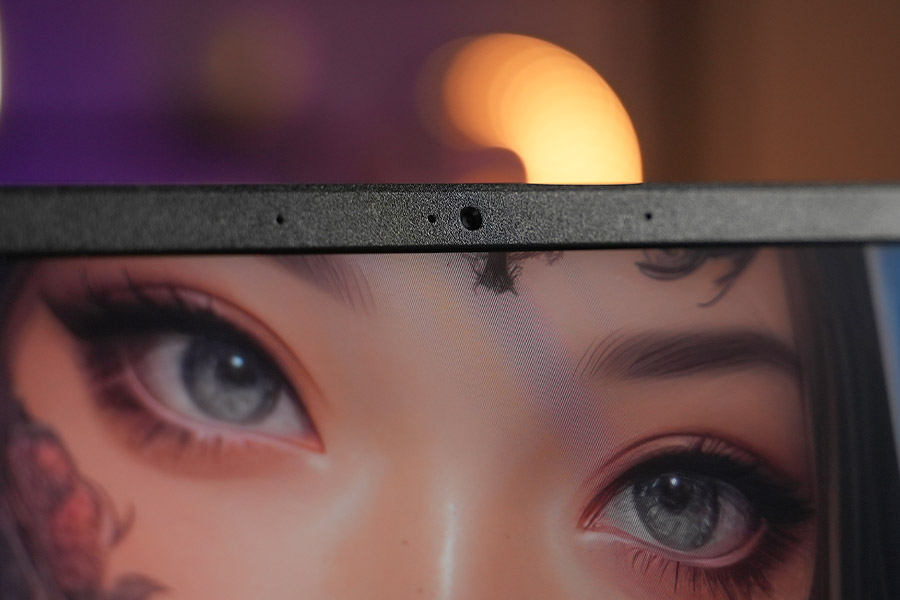
The camera is… well, mediocre at best. It’s a basic 720p sensor, so you shouldn’t expect much from it. The image looks soft, lacks detail, and often feels pixelated. It gets the job done for casual video calls or quick meetings, but anything beyond that will leave you disappointed. I would suggest you to get an external camera with good quality if you really want something better.
Audio and battery life
- Stereo Speakers
- 76 Wh battery with 135W charging
While playing music or watching videos, the audio sounded clear and balanced. It feels okay for casual media use, though it is not as loud or punchy as the Lenovo Legion Pro 5 which we just reviewed. Overall, it gets the job done; however, I wouldn’t expect a lot from it. For gaming, I would definitely recommend sticking with a headset.
I tested the microphone alongside the camera, and this was actually a pleasant surprise. While the audio was slightly distorted, it didn’t lose important details, and the noise cancellation also worked pretty well. I was playing fairly loud music when I tested the video capture, and when I reviewed the footage, I could not hear any music at all.
The Battery life is pretty solid as well. The Nitro V 16S lasted about 6 hours on normal use, but switching to eco mode extended that to around 7 hours. The laptop also stayed cool, even under normal use. This is also one of the lowest-wattage power bricks I have seen for an RTX 5050. Even the Lenovo LOQ with RTX 2050 has a 135W adapter.
Performance
- AMD Ryzen 7 260
- NVIDIA RTX 5050 graphics (85W TGP)
- 16GB DDR5, 512GB NVMe PCIe M.2
The laptop handled everyday tasks like browsing the internet, multitasking, and using apps without any issues, and everything feels smooth. But I did run into one issue: Chrome froze and even crashed a few times, which was unusual. Other apps worked fine, so this might be a software-side problem rather than a hardware limitation.
The CPU is basically a rebranded version of the Ryzen 7 8845HS; it is built on the same lithography, has the exact core count, and performs similarly to last year's Hawk Point CPUs. The only thing that really feels “new” about the Ryzen 7 260 is the name.
A few Benchmarks
The Nitro V 16S delivered expected multi-core and single-core scores, this indicates that it is well-suited for everyday tasks and more demanding multitasking. It is also well optimised for Photoshop-related tasks, as the PugetBench score is above average for similar-spec laptops, likely due to the SSD, which is as expected for laptops in this range.
The 3DMark results also indicate that this laptop can run most AAA games at 1080p on medium-high settings, as further demonstrated by our gaming test in the next section.
Gaming time
Moving on to the gaming section, the Nitro V 16S gave quite a nice experience. Starting with a CPU-demanding game like CS 2, the gameplay felt smooth, and I also didn’t detect any stutters or dips. However, when comparing side by side with a laptop boasting a stronger CPU, such as the Core i5-13450HX (with an RTX 4050 on the LOQ 15), the disparity became clear, with the more powerful CPU attaining more than 40 fps.
Forza Horizon 5 also ran as expected both with and without DLSS enabled. The performance without DLSS was almost identical to the RTX 4060 LOQ 15. Once DLSS was enabled, the Nitro was ahead by 50 fps, which highlights the RTX 5050's advantage in DLSS scaling.
Cyberpunk tells a whole different story. When playing without FG (Frame Generation), the game felt barely playable. Enabling frame generation makes a noticeable difference, but the 4x frame generation in the RTX 5050 truly transforms the experience, making it feel smooth and playable.
One thing you will definitely notice is the heat. When I was playing, the center of the keyboard reached nearly 50 degrees Celsius!! This is understandable since it is a slim laptop, and such heating is common during long gaming sessions.
Acer Nitro V 16S AI (2025) Review: Conclusion
So, does this laptop meet the standard for the best thin-and-light gaming laptop? In a way, it does, it has what it takes to be a good thin and light gaming device, but like I said before, the V 16S series is the most underperforming in Acer Nitro Gaming laptops. The cost is also not on the better side. We can get the Acer Nitro 16 AI with Ryzen 5 240 and the same GPU at a relatively lower price, or the Lenovo LOQ with Ryzen 7 250 and a higher TGP can also be a great alternative if you don't care much about the laptop being thin.

Acer Nitro V 16S AI (2025) Review: Pros and Cons
| Pros | Cons |
|---|---|
| Slim and Lightweight for 16-inch | Prone to Smudges |
| Display looks good for IPS | Pixelated Camera |
| Solid battery life | Only one Type-C port |
Article Last updated: December 20, 2025

![DJI Gimbals Price in Nepal 2026 [Updated]](https://media.gadgetbytenepal.com/2022/06/DJI-Gimbals-Price-in-Nepal-2022-min.jpg)