The new service lets eligible driving license holders access and download their driving license online through the official DoTM portal.
-portal..png)
The Department of Transport Management (DoTM) has introduced a new online service that allows eligible driving license holders to download their driving license through the Electronic Driving License (EDL) portal. The feature enables users to access their issued driving license digitally without having to visit transport offices simply to obtain their license details.
Key Highlights
- DoTM has introduced an online service that lets eligible driving license holders download their issued driving license.
- The service is available through the Electronic Driving License (EDL) portal of the respective province.
- Users need their driving license number, date of birth, and an OTP sent to their registered mobile number to download the license.
- The feature is only available for licenses that have already been issued and uploaded to the DoTM system.
- DoTM has not yet announced whether the downloaded driving license has the same legal validity as the physical smart driving license.
The service comes as a welcome addition amid the long-running delays in the printing and distribution of smart driving licenses in Nepal. Eligible users whose licenses have already been issued can now conveniently access and download their driving license through the official EDL portal.
Who can download the driving license?
The service is available only to driving license holders whose licenses have already been issued and are available in the DoTM system.
Applicants who have only passed the written or trial examination but whose driving license has not yet been issued will not be able to use this feature.
Province-wise driving license download portals
License holders should visit the Electronic Driving License (EDL) portal corresponding to the province where their driving license was issued.
| Province | Portal |
|---|---|
| Koshi Province | https://edlvrs.koshi.gov.np |
| Madhesh Province | https://edlvrs.madhesh.gov.np |
| Bagmati Province | https://edlvrs.bagamati.gov.np |
| Gandaki Province | https://edlvrs.gandaki.gov.np/edl |
| Lumbini Province | https://edlvrs.lumbini.gov.np |
| Karnali Province | https://edlvrs.karnali.gov.np |
| Sudurpashchim Province | https://edlvrs.sudurpashchim.gov.np |
How to download your driving license online
Step 1: Open your province's EDL portal
Visit the Electronic Driving License (EDL) portal for the province where your driving license was issued.
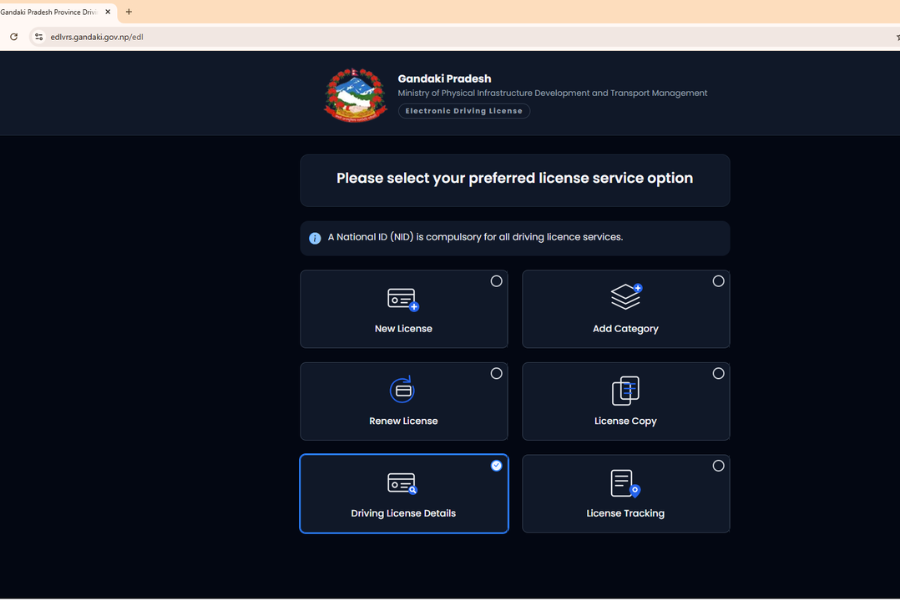
Step 2: Click on "Driving License Details"
On the homepage, click the “Driving License Details” option.
Step 3: Enter your license details
Fill in all the required information:
Then click Submit.
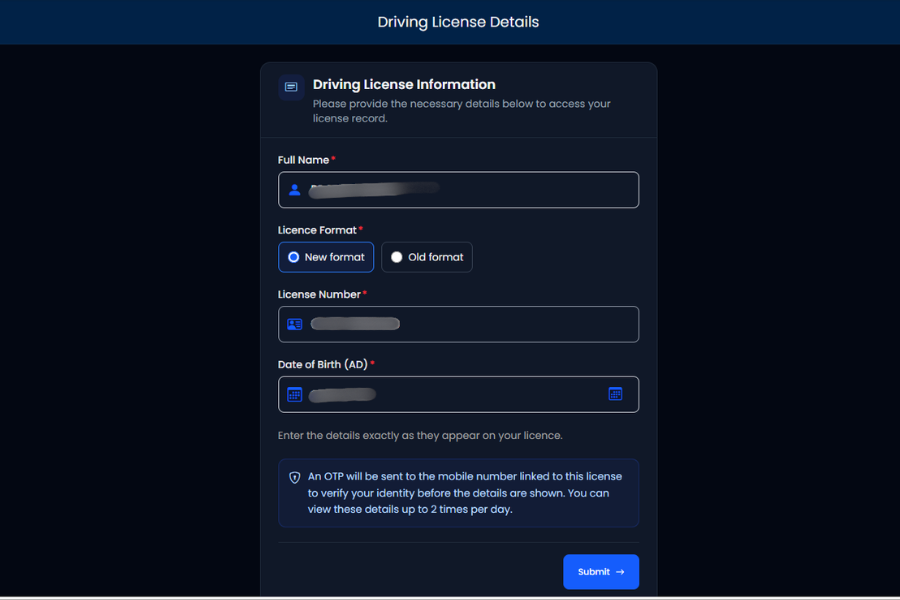
Step 4: Verify your identity using the OTP
After submitting your details, the system will send a One-Time Password (OTP) to the mobile number registered with your driving license.
Enter the OTP in the verification field and click Verify to continue.
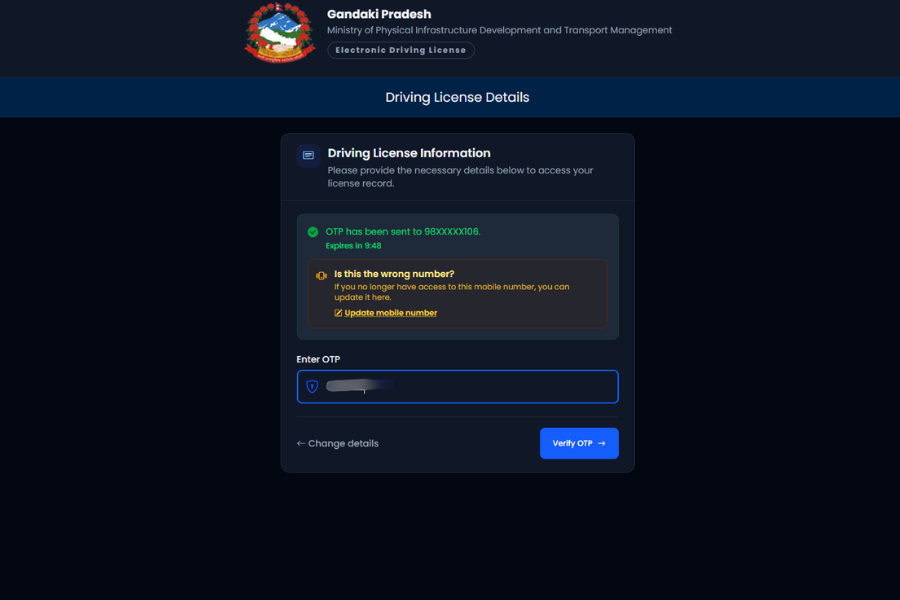
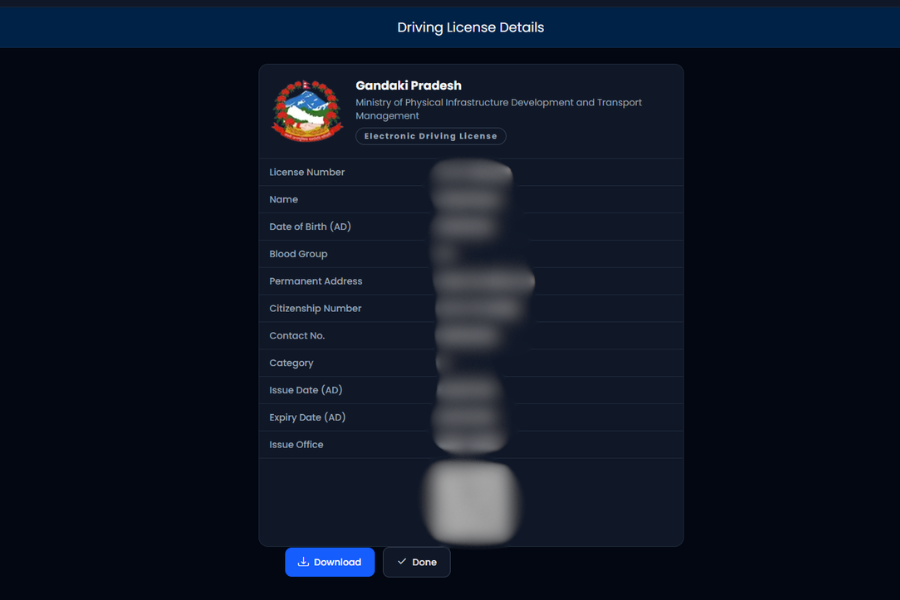
Step 5: Download your driving license
Once the OTP is successfully verified, your driving license details will appear on the screen. Click the Download button to save the digital driving license to your device.
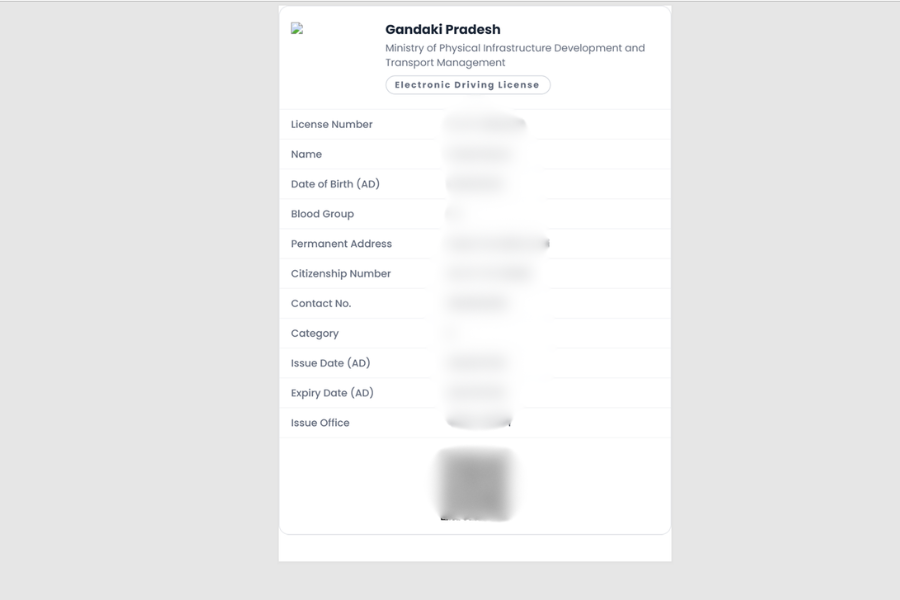
Once downloaded, the digital driving license appears like this and comes with a QR code for verification.
What if your license cannot be downloaded?
If your license does not appear in the system, it could be due to one of the following reasons:
- Your driving license has not yet been issued.
- Your license record has not yet been uploaded to the EDL system.
- The information entered does not match the official record.
In such cases, users are advised to verify their details and try again later or contact the concerned transport office.
Is the downloaded driving license equivalent to the physical smart card?
While DoTM now allows eligible license holders to download their driving license online, there has been no official decision or announcement stating that the downloaded license carries the same legal validity as the physical smart driving license.
Until DoTM issues an official clarification, users should not assume that the downloaded license can be used in all situations where the physical smart card is required. License holders are advised to follow the latest guidelines issued by DoTM and the concerned authorities regarding the acceptance and use of digital driving licenses.
Article Last updated: July 24, 2026