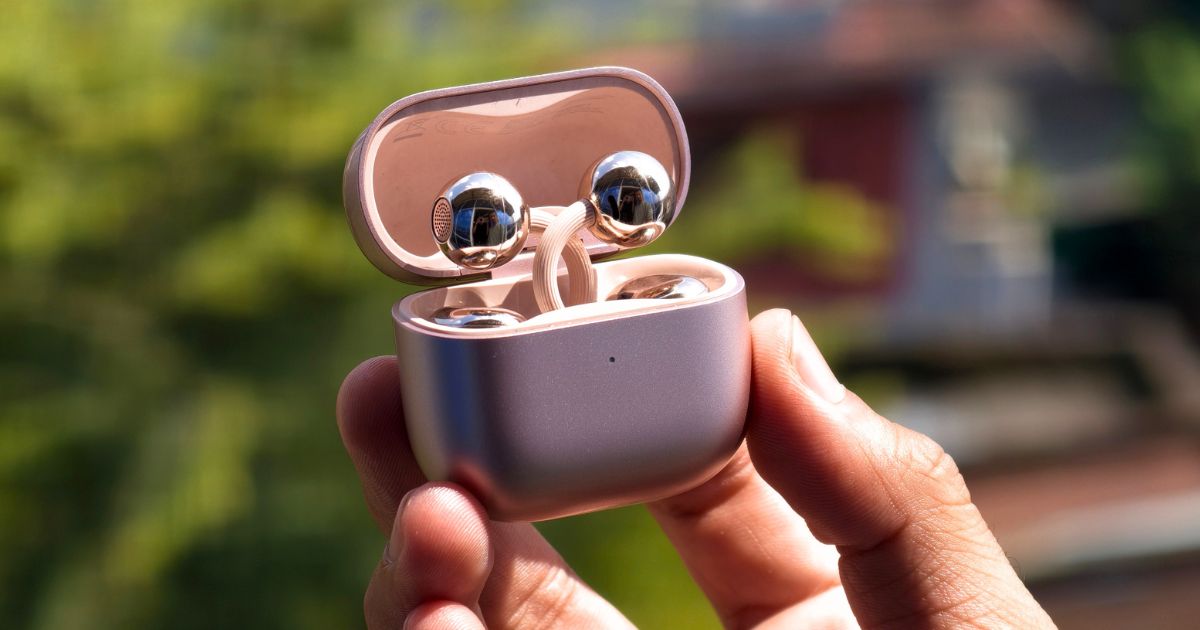
Not your typical TWS, but one I surely enjoyed using.
Why Trust Gadgetbyte?
At Gadgetbyte, we invest substantial hours into rigorously testing each product or service we review, guaranteeing that you make informed purchases. Learn more about our testing process.
Review Overview
4.4
Design and Comfort
9/10
The Huawei FreeClip 2 combines a stylish, jewellery-like design with crisp sound, reliable calls, and good battery life. While the fit may take some getting used to and it also has a pretty steep price tag, these are open-ear earbuds I genuinely enjoyed using.
Sound
8.3/10
Calls and Controls
9.4/10
App and other features
8.5/10
Battery
8.9/10
Value for money
8.4/10
Alright, here I am again with yet another earbuds review. This time I am going to talk about the Huawei FreeClips 2. It's been around five months since Huawei introduced the FreeClips 2 in Nepal, and I was genuinely excited to use them. Because unlike the usual TWS earbuds I’m used to, this guy is totally different in some aspects—be it its design, how it is worn, how it feels when worn, its sound quality, and whatnot. And honestly, the tiny rose-gold case looked soooooo cute that I had to give it a try.
Well, wearing them for the first time did feel a little weird, but trust me, anyone will get used to them in no time. I was really surprised by the sound, especially considering how open-ear earbuds can massively compromise in terms of sound quality. But it was not the only part I was curious about. Since clip-on buds don’t seal the ears like normal in-ear earbuds, I wanted to know how distracting or helpful the surrounding awareness thing was. So, after spending some time with the Huawei FreeClip 2, here’s how it performed in my everyday use.
Huawei FreeClip 2 Specifications:
- Design: Open-ear clip-on design with Airy C-bridge structure, IP57 dust and water resistance rating for the buds and IP54 rating for the case
- Driver: 10.8mm dual-diaphragm driver unit
- Sensor: Call noise cancellation/Multi-EQ sound effects (includes custom sound effect), Adaptive volume
- Call Quality: 3-microphone system paired with multi-channel Deep Neural Network (DNN) AI noise reduction
- Audio Codecs: SBC, AAC, and Huawei L2HC (up to L2HC 4.0)
- Sound Features: Adaptive Volume and Adaptive Voice Enhancement
- Connectivity: Bluetooth 6.0, multipoint connectivity (2 devices)
- Companion App: Huawei AI Life app (Android | iOS)
- Battery Life: 60mAh per earbud and 537mAh charging case
- Up to 9/38 hours of music playback (earbuds + case)
- Up to 6/25 hours of voice calling (earbuds + case)
- Fast Charging:
- USB Type-C wired (5V/1.5A) and Qi wireless charging (up to 3W)
- Wired charging speed: Case only: ~50 mins | Earbuds + Case: ~60 mins | Case to Earbuds: ~40 mins
- Wireless charging speed: Case only: ~150 mins
- Quick charge: 10-min charge provides up to 3 hours of music playback
- Controls:
- Wide-area gesture controls (Double-tap/Triple-tap anywhere on the Acoustic Ball, C-bridge, or Comfort Bean)
- Volume adjustments: Swipe gestures exclusively located on the Comfort Bean area
Huawei FreeClip 2 Price: Quick Comparison


Huawei FreeClip 2 review:
Design and Comfort
- Airy C-bridge design built using a nickel-titanium shape-memory alloy wire core
- 5.1 grams per earbud
- IP57 rating for buds and IP54 for the case
Looks like an accessory, feels like nothing
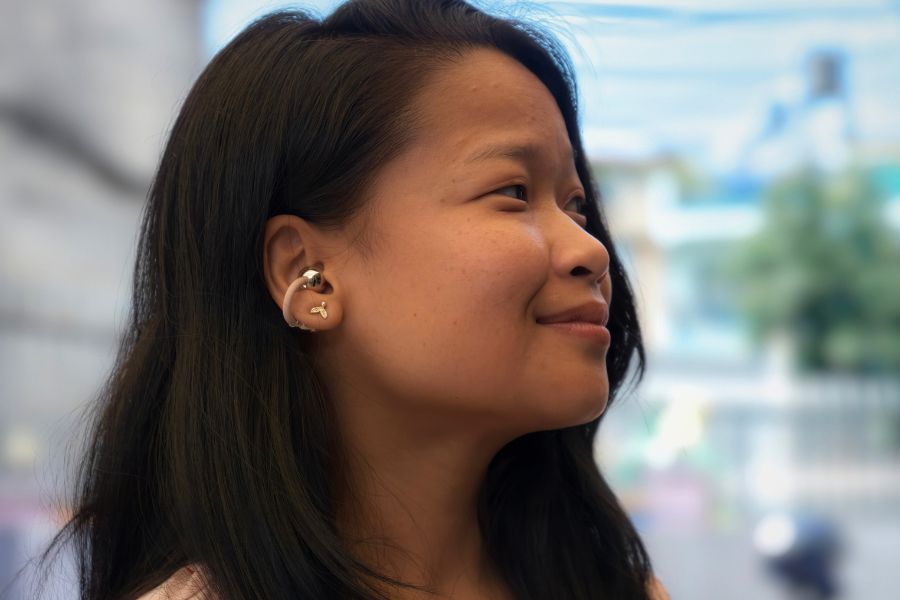
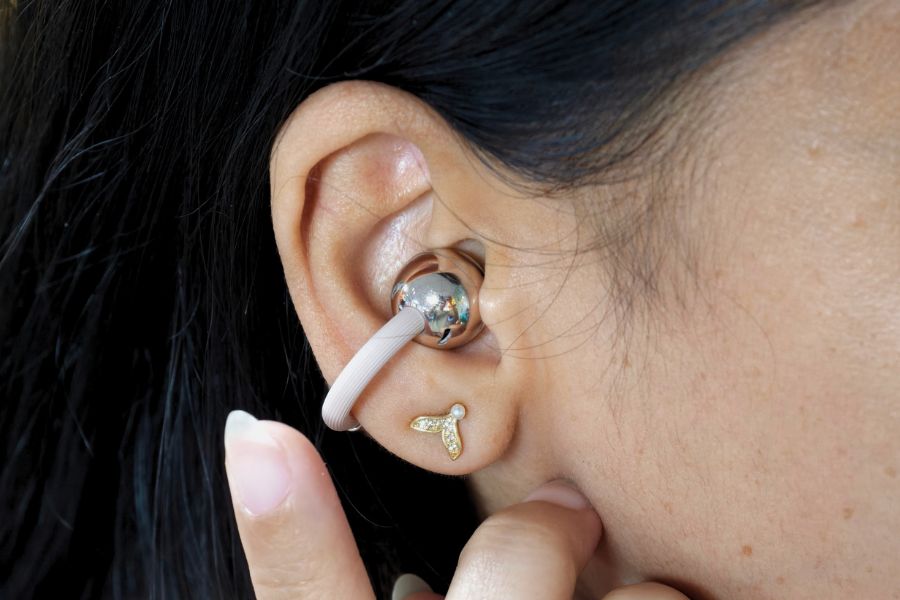
Okay, I feel like Huawei really wants the FreeClip to be seen as a piece of jewellery rather than a pair of TWS alone. Because when I saw them, my first feeling was that they would definitely go so well with some of my dresses. The acoustic ball (aka the part of the FreeClip 2 that actually sits on my ear) has a glossy, rose gold finish, which looks more like an elegant earring. Its case is also cute and compact, with a nice matte finish—giving a premium feel in the hand.
But what surprised me more than its elegant design was how little I could feel the earbuds once I put them on. The C-shaped bridge feels sturdy despite looking quite delicate, and it doesn't put much pressure on my ears. After a while, I could almost forget that I was wearing them.
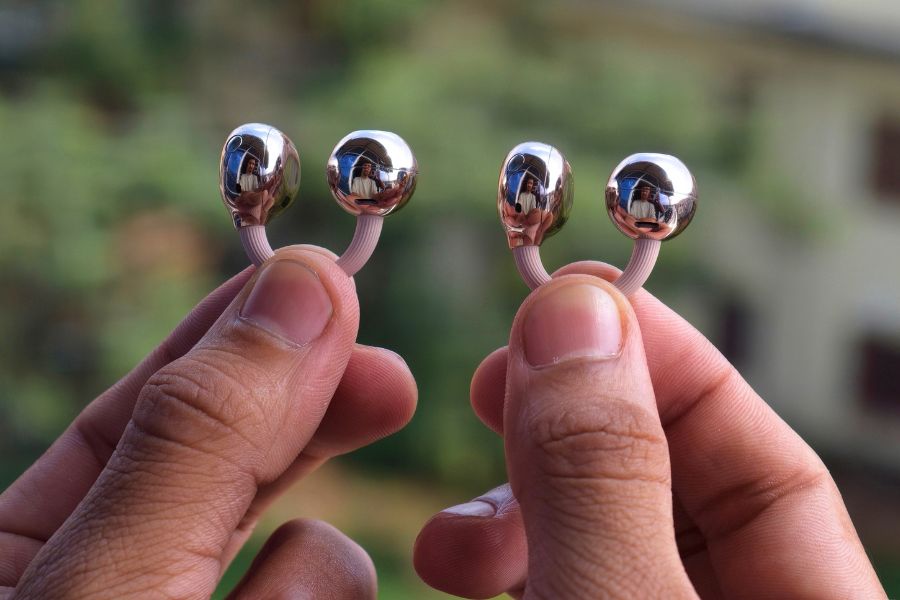
The fit is also really secure. I could walk around and move my head without having that usual “is my earbud about to fall out?” feeling. And this is actually a big deal for me as I already have a history of losing my right-side bud when commuting (sniff, sniff…). However, with the FreeClip 2, that concern simply wasn't there (yayyyy).
Having said that, there was one small issue during longer sessions, though. After around three to four hours, my left ear started to hurt, while my right ear was completely fine. Interestingly, my colleague also felt some discomfort in the left ear after trying them, so positioning might have something to do with it. I wouldn't call it a deal-breaker, it is just something I noticed.
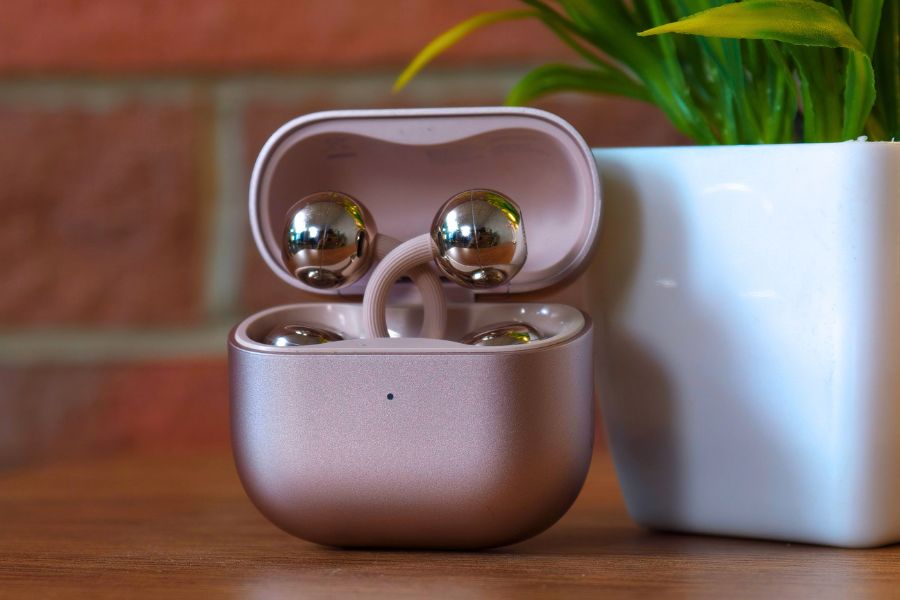
Oh, and putting those earbuds back in the case was actually a little challenging and somewhat fun experience. The first time, I couldn’t quite figure out how to put them back, as they sit quite differently from the usual TWS. It even became a short game among my colleagues to see who could do it in one go—basically proving who was more intelligent. Well, the good news is when you get the hang of it, putting them back is pretty simple and very convenient.
Sound
- 10.8mm dual-diaphragm driver with a dual-magnetic-circuit design
- 10-band EQ with preset sound effects
- Open-ear design with reverse-phase sound leakage reduction
I honestly didn’t expect the sound to be this good
Have I mentioned this before? It was my first time using an open-ear pair of earbuds, so I didn’t really know what to expect for the sound. Especially when most of the usual TWS focus more on bass, ANC, and whatnot—which is pretty much the opposite case here. I had also heard that open-ear earbuds can compromise on audio quality, so rather than expecting much, I was more curious to know how they actually sounded.
To my surprise, I really, really, really loved its sound. The FreeClip 2 is clear and crisp, with vocals and instruments coming through nicely. I also liked the separation—everything felt well-defined without getting jumbled together, even when a lot was happening in tracks like Taylor Swift’s “The Fate of Ophelia”. If you know me, I am definitely not a fan of heavy bass, and that’s probably one of the reasons I liked the FreeClip 2’s sound this much.
I don’t mean to say that its audio is flat or bland either. There is still enough punch in the upper bass region to keep the music lively, without overpowering anything else. That said, if your playlist mostly has hip-hop, EDM, rock, and similar genres of songs where bass is the key element, the FreeClip 2 is not made for you at all. Because, by design, it has quite terrible sub-bass and lower-bass response.
Now, coming to its “surrounding awareness” concept, it turned out to be quite a unique experience. I would be listening to my favorite tunes at work… and whenever my colleagues nearby would ask me anything (or fooling around like they do so often), I could answer them or join in on the banter without pausing the music or anything. That felt almost surreal at the beginning instead of distracting like I initially thought.

And whenever I wanted to ignore the outside noise, I mostly kept it at around 60-70% volume, which was the sweet spot for me. In fact, it worked quite well too. Even in louder environments, like on a bus with loud music playing or while walking on the road with all the traffic, I can say I didn’t miss ANC at all. These earbuds are truly a great fit for someone like me who wants to enjoy music without blocking out their surroundings.
And, of course—in quieter places, I could comfortably lower the volume to around 40-50%.
Ohh…talking about the volume, the FreeClip 2 can get seriously loud too. At high volume, I noticed that vocals could sound a little shouty in certain types of songs, especially female vocals compared to male vocals. Like Nazia Hassan’s classic ”App Jaisa Koi”, for example. Especially during the chorus where she goes “काश मुझ पर ऐसा दिल आपका भी आये…”
Huawei also gives you a 10-band EQ, and several presets in the app, but honestly, I didn’t even bother to check them out since the default tuning had already captured my heart. Or should I say, my ears? (hahaha… cheesy.)
Calls and Controls
- 3-microphone system paired with multi-channel Deep Neural Network (DNN) AI noise reduction
- Swipe, double-tap, and triple-tap controls
- Head motion controls for answering and rejecting calls
Great for calls, even in noisy places
I’d say the call quality on the FreeClip 2 is excellent. But I gotta say I was genuinely doubting its calling performance since the whole deal with open-ear earbuds is letting in the outside noise to make me aware of the surroundings. However, my so-called doubt was thrown straight out of the window the moment I started using them.

Even when I was talking in loud, crowded areas, my voice remained clear—and the ambient noise never got in the way of the conversation. Of course, it doesn’t completely cancel out all the noise, so the person on the other end can still hear some of it when things get really loud or high-pitched, but it never caused any problem during my calls.
There was this one instance where my voice sounded slightly toned down or muffled even when I was somewhere with not a lot of ambient noise. I don’t know exactly what’s the reason behind that, but other than that, I have no complaints.
The controls work well, but good luck rejecting a call with your head
Moving to touch controls, I surely liked them on the FreeClip 2 too. You can use the acoustic ball, C-bridge, or Comfort Bean (the part that sits behind your ear). Tap gesture works across all three, while adjusting the volume uses a swipe gesture on the Comfort Bean. And everything worked particularly well for me.
Double-tapping pauses or plays, while triple-tapping skips forward or backward in the playlist. Just make sure you are quick as a sting bee with the triple tap, though, or it can register only two taps. I also didn’t run into the accidental-touch problem, which is usually quite annoying with touch-sensitive earbuds. I could tuck my hair behind my ear or touch around my ears without accidentally triggering anything.
Well… the head controls were a bit more hit-and-miss in my case. Answering a call with a simple nod was super easy, but rejecting one was a real struggle. I had to shake my head quite a bit before it registered, and at one point I was genuinely getting dizzy trying to make it work. Huawei even has a tutorial for these gestures in the app, where I can proudly say I failed the head-shaking test with flying colors. (This calls for another yayyy…)
App and Other Smart Features
- Huawei AI Life app
- Adaptive volume and spatial audio
- Dual-device connection
Simple and straightforward
The Huawei AI Life app is quite easy to navigate and straightforward to use, so I don’t think anyone would have trouble finding their way around it. I did check out its experimental feature, though.
I knew it had an Adaptive Volume feature, which is supposed to adjust the volume based on your routine and surrounding noise. I initially thought it was enabled by default, but I didn’t notice the volume adjusting during my daily commute. I only realized later that it needed to be turned on manually. But it does use quite a bit of power, so I eventually left it off.
There’s also Spatial Audio, with “Fixed” and “Head Tracked” modes. I tried the Fixed mode, which made the sound feel like it was coming from slightly farther away, but the effect wasn’t noticeable with every song. And personally, I didn’t find it particularly useful.
The FreeClip 2 also supports dual-device connection, and it worked fine for me. Other than that, I mostly stuck with the default settings, which were already good enough for my use.
Battery and Charging
- Up to 9 hours of playback on a single charge, up to 38 hours with the case
- Wired and wireless charging support
Good battery life that I didn’t have to worry about
Now, let's talk about battery life. Huawei claims up to 9 hours of playback on a single charge, with the charging case extending the total to 38 hours. And for my usual listening over the past four or five days, I only had to charge the case once. I haven’t actually run out of battery on the earbuds themselves either.
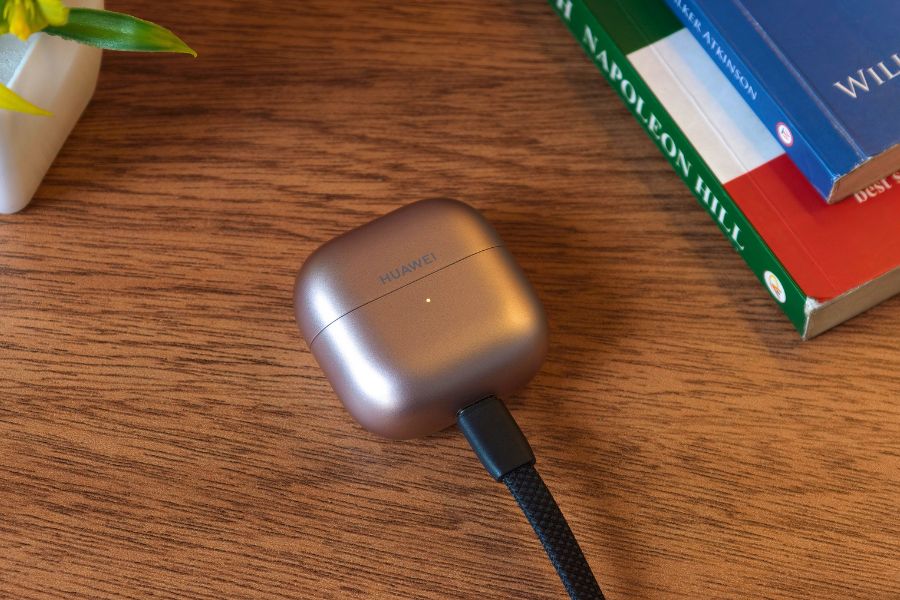
As for charging, I used a wired connection, and it took around 50 to 55 minutes to fully charge the case. The charging case also supports wireless charging, which is convenient if you prefer a cable-free setup. So yeah, I could listen to music without constantly worrying about the battery, and that’s pretty much what I want from a pair of earbuds.
Conclusion
After using the Huawei FreeClip 2, I can say that I really enjoyed my time with these earbuds. I went into this review having never used a pair of open-ear, clip-on earbuds before, and honestly, I didn't expect to like them this much. The sound was surprisingly good, and I found the whole concept quite fun to use. (I mean, look at its desssiiiggnnn..)
Of course, the price of around Rs. 34,000 does feel a little too much for a pair of earbuds. But if you're someone who is specifically looking for open-ear earbuds rather than traditional TWS, I'd say the FreeClip 2 is definitely worth considering. It's a really good pair of clip-on earbuds.
Huawei FreeClip 2 review: Pros and Cons
| Pros | Cons |
| Good sound quality | Price feels a little steep |
| Lightweight and accessory-like design | Not suitable for the bassheads |
| Excellent call quality | Can cause discomfort during long sessions |
| Good battery life | Head gestures for rejecting calls can be tricky |
| Easy-to-use touch controls with minimal accidental touches |
Article Last updated: October 11, 2026
![Realme Mobile Price in Nepal [Updated 2026]](https://media.gadgetbytenepal.com/2025/11/Realme-Mobile-Price-in-Nepal.jpg)
![Hisense TV Price in Nepal [Updated]](https://media.gadgetbytenepal.com/2026/10/Hisense-TV-Price-in-Nepal-2026.jpg)