Android comes with a 24-hour waiting policy to tackle the manufactured urgency.
Google finally introduced some kind of easing of sideloading the app with its security update earlier this month. Also, last Thursday, Google announced that it is building a simpler environment for installing Android apps from outside the Play Store. They also disclosed details of advanced flow settings. According to them, the Android verification requirement can be easily disabled, allowing the installation of apps outside the Play Store. This article will discuss details, including the risks we have seen in the past, current updates from Google, and what the future will bring.
Android sideloading Overview
What is Sideloading
As we all know, Android has always been the platform where we were free to use third-party apps without any restrictions. We have seen the user's preference for Android over iOS due to this feature. But earlier this year, Google announced a policy that will completely restrict sideloading unauthorized apps on devices. This has created a fuss among the users. So, to regain the trust of its users, it introduced an updated policy on sideloading unauthorized apps. Honestly, this policy is somewhat beneficial for individuals with extensive technical knowledge, but it also has drawbacks for those who use devices with minimal technical knowledge.
The risks before these security updates
For years, we have seen that the risk of sideloading is driven not only by bad app code but also by scammers' use of technology to trap people. We mostly notice that in most cases of digital theft, the scammer creates a manufactured sense of urgency that leads the user to panic. This action makes it easier to perform digital theft. For example, we might get a call from a bank impersonating an agent or police officer, claiming they need to guide you through turning off your phone's security features.

According to the 2025 GASA report I looked into, 57% of adults were targeted by such scams, resulting in the loss of billions of dollars. A positive aspect to consider is that Google is finally addressing the need for the human side of security, which will help most individuals before any scam occurs. However, some people also believe that Google has used safety as an excuse for many years to keep people locked into its own sphere, where it can control everything and take a cut of the money.
The new plan introduced by Google
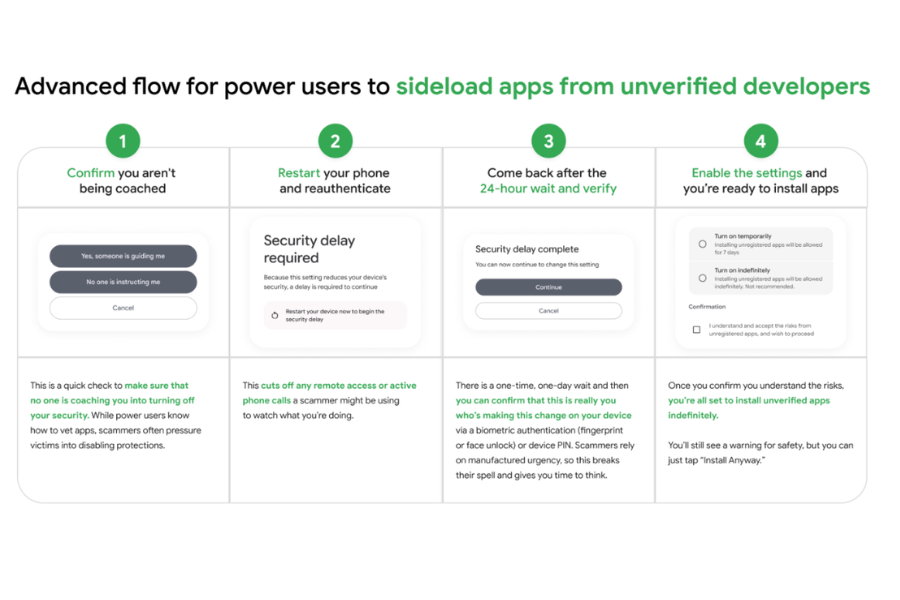
To fix the previously raised issue, Google has launched Advanced flow. You will have 6 steps to follow.
Step 1: Manual developer mode activation- First, open Settings, go to About Phone, and tap Build Number 7 times. Through this process, you will ensure that you are not a scammer and that you are doing this intentionally, as scammers often use one-tap tricks to bypass security. But forcing a user to manually unlock developer options makes it harder to do by accident.
Step 2: the coaching check- After you turn on the developer mode, a warning screen will pop up asking, “Is someone asking you to do this?” Here, you must manually give confirmation that you are acting on your own and not being guided by a voice on the phone or a message.
Step 3: Mandatory Device Restart- After confirming that you are not guided by any third party, restart your phone. This is the most important step, as it will further ensure the authentication of the information you initially provide. This will also prevent scammers from accessing your screen through remote access by any means.
Step 4: Re-Authentication- After restarting your phone, you need to use PIN, PATTERN, or Biometric to log back in. This will further ensure that the person using the phone is the actual owner.
Step 5: The 24-hour protection waiting period- In our research, we find that the most discussed step in this flow is the 24-hour waiting period for protection. After you finish re-authentication, you cannot install any unverified app immediately. You have given the 24-hour countdown. This is an introduction to dissolve the manufactured urgency that many users try to create.
Step 6: Final confirmation and Choice- At this point, you will once again return to the setting and confirm the change one last time with your biometrics, that you introude you to two further steps:
- You can allow the device for one week for the installation of the unverified app that is suitable for a quick test
- Or you can grant the device indefinite, permanent access.
My thoughts on current updates
Because of the legal battle with Epic Games, Google is lowering its commission from 30% to 20% and allowing developers to use their own payment systems. I found this interesting, as we will see more third-party app stores, like Epic Games Store, becoming easier to use on Android. Furthermore, Google is offering hobbyists and students free accounts to share apps with up to 20 friends without needing a government ID. This also looks interesting initially, but in the long run, a split ecosystem could be a headache. Though a 24-hour waiting period is the biggest safety net for the user, a user with basic Android knowledge might find it a little harder.
- Also Read:
- Meta Is Effectively Killing Horizon Worlds VR, Then Partially Walked It Back
- Meta finally includes Nepali creators in the Facebook Monetization Program
- Google Maps gets Ask Maps and Immersive Navigation, Its biggest update in over a decade
Android sideloading: Conclusion
The era of the locked smartphone is ending, as this settlement among big tech companies proves they could not maintain total control forever. By August 2026, Android users will have the most freedom they have had in decades. However, Google is making it clear that if you steer advanced flow as a shield, you have to be the one to hold it. The good thing is that we finally truly own the device we paid for and can run whatever software we choose without a middleman. But the digital security we have is not built in for everyone, as the burden of not getting scammed falls on the user themselves.
- Meanwhile, you may like our review of the Samsung Galaxy S26 Ultra.
Article Last updated: March 23, 2026

-Price-in-Nepal.png)
![Best Monitors To Buy in Every Price Segment in Nepal [Updated 2026]](https://media.gadgetbytenepal.com/2023/10/best-monitors-to-buy-in-Nepal-2023.jpg)