Apple’s cheapest MacBook, the MacBook Neo… or Dell’s latest XPS 13? Which budget laptop should you buy right now?
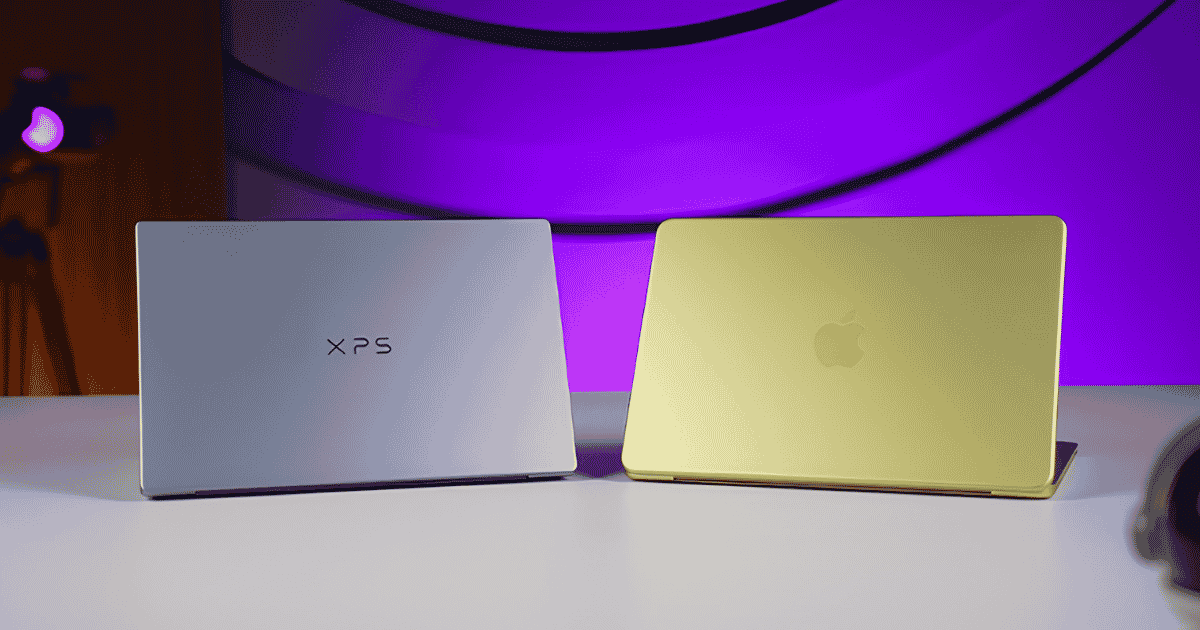
For years, MacBooks and Windows laptops have been compared head-to-head, with both sides having their own strengths and weaknesses. But with Apple’s affordable MacBook Neo and Dell’s latest XPS 13 now starting at a similar price point, this comparison has become more interesting than ever.
The MacBook Neo costs NPR 135,000 in Nepal, while the Dell XPS 13 is yet to launch here but should arrive at a similar price range. I have been using both laptops side-by-side for over a week now, and the differences between them are more interesting than I expected.
So yeah, in this article, I will compare the Dell XPS 13 and MacBook Neo across design, display, keyboard, performance, and battery life to see which one is actually worth considering.
Dell XPS 13 vs MacBook Neo: Specifications
| Specifications | Dell XPS 13 | MacBook Neo |
|---|---|---|
| Dimensions, Weight | 296.9 x 200.66 x 12.7, 1.0 kg | 295 x 212 x 16.1 mm, 1.20 kg |
| Display | 13.4-inch, 2.5K (2560 × 1600), 120Hz, 100% DCI-P3, 500 nits | 13-inch IPS LCD, 2.4K (2408 × 1506), 60Hz, 500 nits, True Tone |
| Keyboard | backlit keyboard | Magic Keyboard, non-backlit |
| Security | TPM 2.0 | Touch ID (512GB variant only) |
| Processor | Intel Core 5 320 (6C/6T, up to 4.6GHz) | Apple A18 Pro |
| RAM | Up to 8GB LPDDR5x | 8GB unified memory |
| Storage | Up to 512GB Gen 4 NVMe SSD | 256GB / 512GB SSD |
| Audio | quad-speaker audio setup | Dual speakers with Spatial Audio and Dolby Atmos, dual-array microphones |
| Battery | 52Wh, 65W charging | 36.5Wh, 30W charging |
| Webcam | 1080p FHD camera | 1080p FHD camera |
| I/O Ports | 2x USB 3.2 Gen 2 (10Gbps) | 1x USB 3 Type-C, 1x USB 2 Type-C, 1x 3.5mm headphone jack |


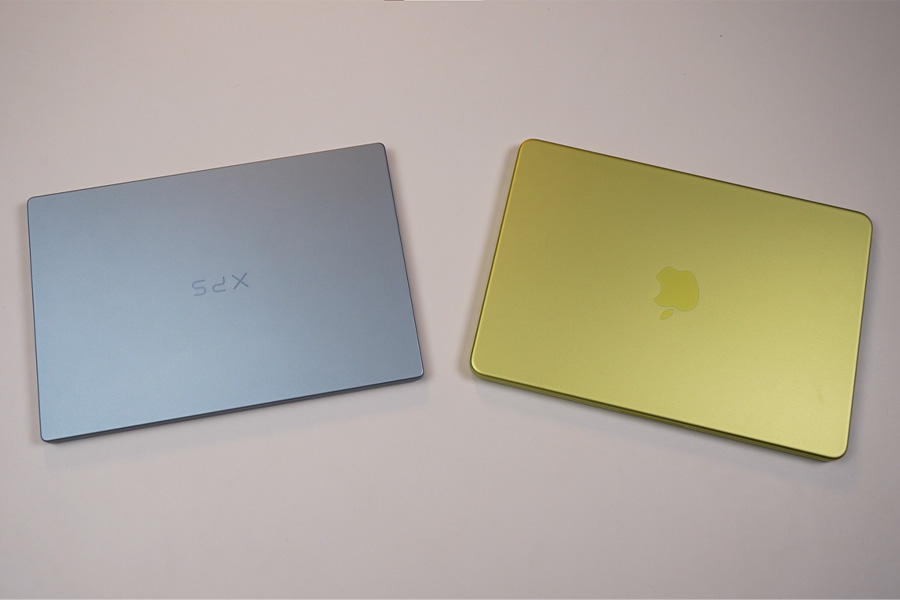
Alright, let’s start with the design. Honestly, I wasn’t expecting the XPS 13 to feel this premium. Just like the MacBook Neo, it comes with an aluminum unibody chassis that feels both solid and well-built. It is also about as thin as the Neo and slightly lighter, while the hinge and overall build feel really sturdy.
The XPS 13 also has an edge in terms of ports. Both laptops have two USB-C ports, but the Neo uses USB 2.0, which is quite slow whereas XPS 13 gets faster USB 3.2 ports, with one on each side, making it easier to connect things like external storage or a 4K monitor.
That said, Apple still gets a couple of things right. The MacBook Neo has a 3.5mm headphone jack, which Dell has skipped on the XPS 13. I also prefer the Neo’s more vibrant color options. The pale blue XPS 13 looks classy, but the Neo definitely has more personality.
Overall, both laptops have a great design, and each has its own advantages.
Display
Okay, next up is the display, and this one is an easy win for Dell. Both laptops match at 500 nits of brightness, but beyond that, the XPS 13 comes out ahead in pretty much every other aspect.
You can tell the difference just by looking at them. The XPS 13 has much thinner bezels, which look a lot nicer than what you get on the MacBook Neo. Dell has also managed to fit a larger display into a similarly sized chassis. On top of that, it’s a touchscreen, although there’s no stylus support, and you get better viewing angles along with an anti-reflective coating that works surprisingly well.
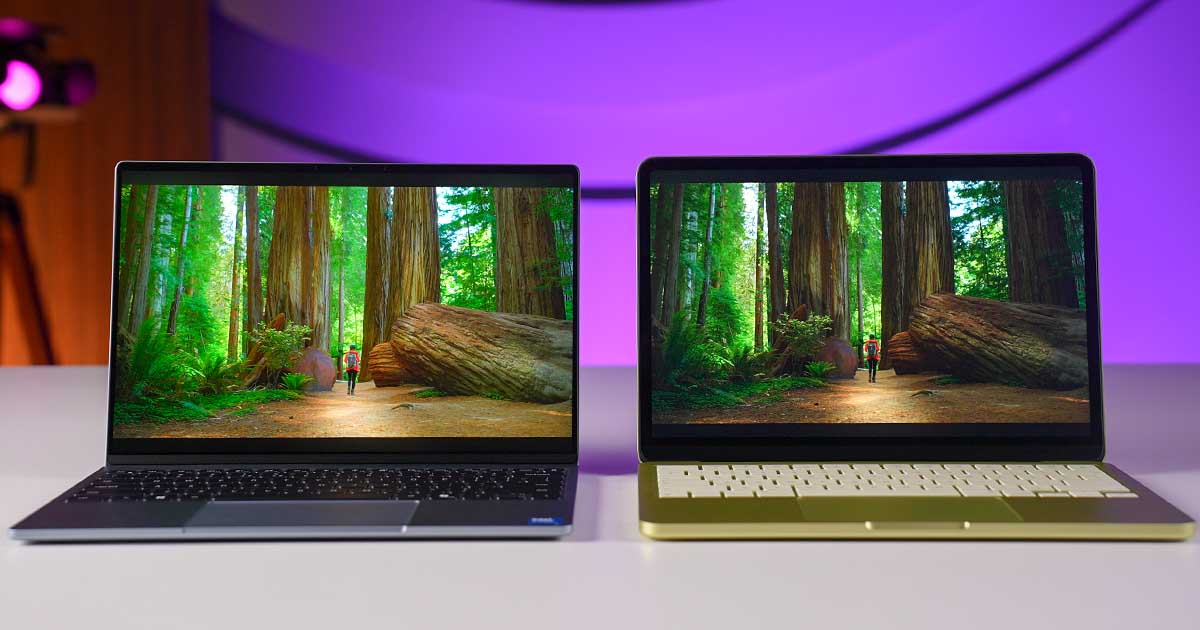
Looking at the numbers, the XPS 13 covers 100% of the DCI-P3 color gamut, compared to around 70% on the Neo. So, while both displays are perfectly fine for things like watching videos and browsing the web, the XPS 13 is a better option for light photo and video editing.
And then there’s the 120Hz refresh rate, which can drop as low as 30Hz to save power. So whether you’re scrolling through websites or just moving around Windows, everything feels noticeably smoother on the XPS 13.
The only thing I’m not a huge fan of is the contrast. It can look a little washed out, but that’s basically a trade-off of the anti-reflective coating, so I wouldn’t worry about it too much.
Speakers, Keyboard, Trackpad, and Webcam
I was actually expecting the XPS 13’s quad speakers to blow me away compared to the Neo’s two speakers, but that wasn’t really the case. The MacBook Neo’s speakers sound more balanced overall. They aren’t louder than the XPS 13, but Dell’s tuning is quite sharp and has a treble-heavy sound, so I prefer the Neo here.
The keyboard, on the other hand, is equally good on both. And I’m saying this as someone who really likes MacBook keyboards. The XPS 13’s keys feel a little more springy and bouncy than the Neo’s, but I could maintain my usual typing speed on both without any problem. The deciding factor is the backlighting, though. The XPS 13 has backlit keys while the Neo doesn’t, so this one goes to Dell.
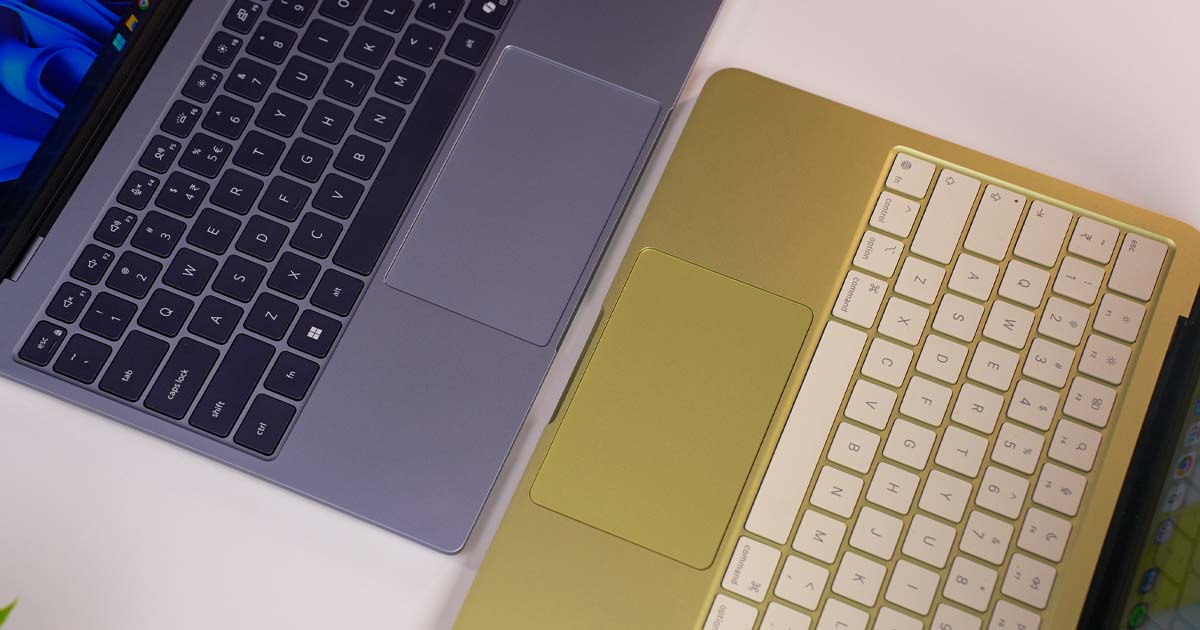
For the trackpad, I’d actually pick the MacBook Neo. Both have spacious glass-topped mechanical trackpads that feel smooth and work well with gestures. The problem with the XPS 13 is its diveboard-style trackpad, where you can’t really click towards the top. On the Neo, you can click pretty much anywhere, and I simply prefer that.
And finally, I’d also take the Neo’s webcam. If you spend a lot of time in meetings, the Neo gives you better image quality. The XPS 13 does have a wider field of view, and its IR camera is useful for biometric login, but the actual video quality just isn’t as good.
Battery Life
Now let’s talk about battery life. And honestly, I was pretty sure the MacBook Neo would win this one by a comfortable margin. But after running both laptops through my usual battery drain test, I was actually surprised by the result.
I used them for web browsing, working on Word and Excel documents, and streaming YouTube videos. The MacBook Neo lasted 10 hours and 27 minutes, while the XPS 13 managed to push through for around 11 hours.
That’s not a huge difference, I know, but I genuinely expected the XPS 13 to fall behind by at least a couple of hours. So, I was definitely surprised here. Charging is another easy win for Dell, though. The XPS 13 comes with a 65W charger, while the MacBook Neo only includes a 20W power brick.
Performance
Finally, let’s talk about performance, and things get pretty interesting here. The MacBook Neo is powered by Apple’s A18 Pro chip with 8GB of memory and 256GB storage in the base model. Dell, on the other hand, went with Intel’s new Core 5 320 “Wildcat Lake” CPU, along with 8GB RAM and 512GB storage.
So, you’re getting double the storage on the XPS 13 for the same price. And yes, the SSD is also user-replaceable, with much faster read and write speeds. But of course, having faster storage doesn’t necessarily mean having faster performance.
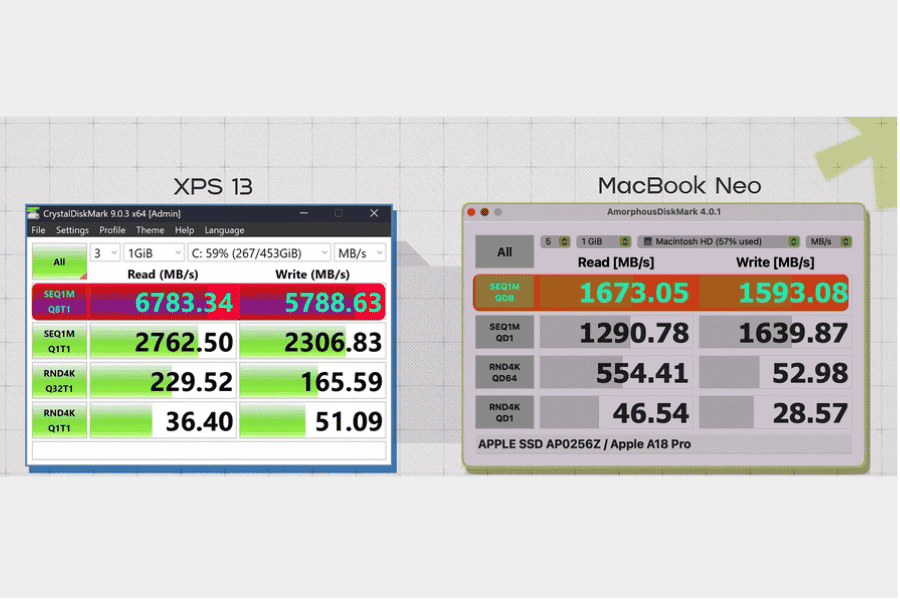
But when I ran both laptops through a series of benchmarks, the results were quite interesting. Except for the multi-core CPU tests, the MacBook Neo outperformed the XPS 13 in most areas. It took the lead in CPU and GPU benchmarks, Speedometer, which measures web browsing responsiveness, and PugetBench’s Photoshop test.
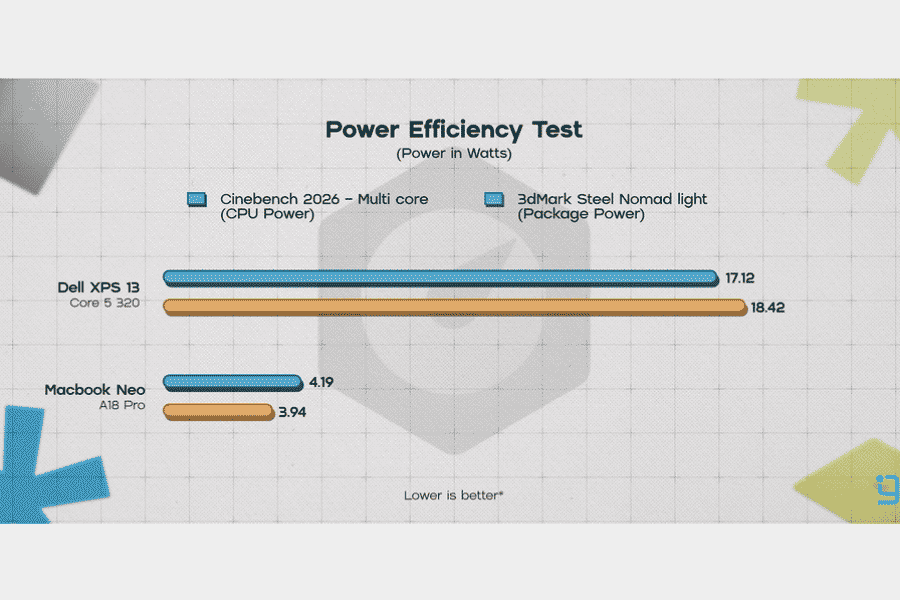
I don’t think I need to say much about power efficiency here. The A18 Pro uses around four to five times less power than the Intel chip in the XPS 13. While Apple has always had an edge in efficiency, the difference here is quite significant.
But how do they actually feel to use? Well, this is where we get into the classic Windows vs Mac debate. The MacBook Neo feels noticeably snappier, while the XPS 13 takes a little more time with things like loading bigger applications, casual multitasking, and even using the Object Selection tool in Photoshop.
And yes, both laptops have 8GB of memory, but how Windows and macOS use that memory is a different story. I noticed browser tabs reloading much more often on the XPS 13 compared to the Neo, which really shows how well Apple has optimized macOS for its hardware.
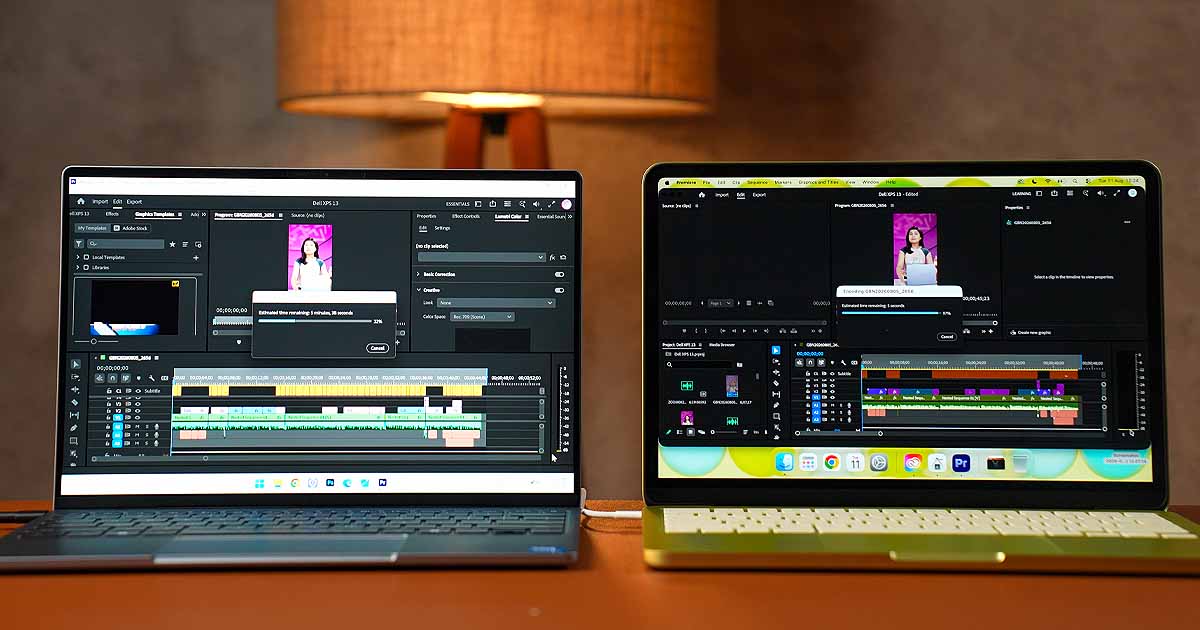
Even with light 4K video editing, the Neo felt a little smoother on the timeline and also delivered better render times. And let’s not forget that the MacBook Neo does all of this without a fan, while the XPS 13 uses two fans to keep things running.
I will say, though, Dell has done a great job with those fans. They are some of the quietest I’ve tested on a laptop, reaching only the high 30dB range under full load. Even so, the MacBook Neo is clearly the performance champ between these two.
That doesn’t mean the XPS 13 feels slow or anything. If you’re a student, office worker, or just a casual user who mainly browses the web, checks emails, uses Office apps, or streams videos, the XPS 13 is more than capable of handling all of that.
Conclusion
Okay, I guess it’s time to wrap things up. And honestly, I was pretty invested in this comparison too because I genuinely wanted to see which one would come out on top. I can’t remember the last time a Windows vs Mac comparison was this close. After everything, the XPS 13 and MacBook Neo are tied with four wins each.
Dell takes the win in design, display, keyboard, battery life, and charging, while the MacBook Neo comes out ahead in speakers, trackpad, webcam, and performance. So, it really comes down to what matters more to you.
If you’re looking for a thin and light laptop in this price range, both the Dell XPS 13 and MacBook Neo are really compelling options. They take very different approaches, but honestly, you can’t go too wrong with either one.
- Watch our video review of the Dell XPS 13 vs MacBook Neo
Article Last updated: August 17, 2026
![Apple iPhone Price in Nepal [Updated 2026]](https://media.gadgetbytenepal.com/2025/12/Apple-iPhones-price-in-Nepal.jpg)
![Nothing Phones Price in Nepal [Updated 2026]](https://media.gadgetbytenepal.com/2025/11/Nothing-Mobile-Price-in-Nepal.jpg)
![Honor Mobile Price in Nepal [2026 Updated]](https://media.gadgetbytenepal.com/2025/11/Honor-Mobile-Price-in-Nepal.jpg)
-Price-in-Nepal.jpg)