By | Content Writer
Content Writer
Published Dec 1, 2025

Why Trust Gadgetbyte?
At Gadgetbyte, we invest substantial hours into rigorously testing each product or service we review, guaranteeing that you make informed purchases. Learn more about our testing process.
Review Overview
Design and build
8/10
Display
9.5/10
Keyboard
8.5/10
Performance
8/10
Audio
7/10
Webcam
7.5/10
Battery
5/10
Value for money
7.5/10
The Lenovo Legion Pro 5 (AMD) is a sleek-looking midrange gaming laptop with a premium design and a gorgeous 16-inch OLED display. It has all my favorite things, like a full-size, well-spaced keyboard with 24-zone RGB lighting, a fast 165Hz refresh rate, and solid overall performance. That said, if you’re willing to spend a bit more, the Acer Predator Helios Neo 16S AI brings a much faster CPU and a smoother 240Hz display.
So, hello guys! Today I have the all-new Lenovo Legion Pro 5 (AMD) with me. A few months ago, we also reviewed the Legion Pro 5i (Intel) (review), and this time I’m testing the AMD version powered by the Ryzen 7 8745HX and RTX 5060. As you know, Lenovo’s Legion series has a wide range of gaming laptops from the thin and light Slim 7 to the flagship Legion 7, and the 5-series is Lenovo’s best-selling gaming lineup worldwide.
And….
Since I recently reviewed the Acer Predator Helios Neo 16S AI (review) with the Intel Core Ultra 255HX and RTX 5060, I’ll be comparing its performance with this Legion Pro 5 as well. The Predator is only about ten thousand rupees more expensive than the Legion, so I’ll talk in detail in the performance section about whether that extra cost actually makes a difference.

Lenovo Legion Pro 5i Specifications:
- Dimensions: 14.35 x 10.55 x 0.85 – 1.02 inches
- Weight: 2.43 kg
- Display: 16-inch glossy OLED panel
- Display properties: WQXGA resolution, 165Hz refresh rate, 100% DCI-P3 colors, 500 nits brightness (typical)
- Keyboard: Full-size, 24-zone RGB backlit
- Security: No biometric-based login option
- Processor: AMD Ryzen 7 8745HX, 8C/16T, up to 5.1 GHz
- Graphics: NVIDIA GeForce RTX 5060 8GB GDDR7 (TGP 115W)
- RAM: 24GB DDR5-5600MHz
- Audio: Downfiring stereo speakers (2x 2W output)
- Storage: 1TB PCIe 4.0x4 NVMe SSD
- Battery: 80Wh, supports Super Rapid Charge
- Webcam: 5MP (QHD) camera with e-shutter
- Price in Nepal: 245,999
Design and Build
- Dimension: 14.35 x 10.55 x 0.85 – 1.02 inches, 2.43 kg
- Aluminum lid, plastic keyboard deck
As always, I want to start my review with the design and build. When I first unboxed this laptop, I immediately got a fresh and premium vibe from it. The Lenovo logo sits right in the center, subtly engraved into the back lid, giving it a clean and minimal look, and not like those aggressive gaming laptops.
The top cover is metal, which is great, but oh boy, it attracts a lot of fingerprints, I mean, a lot of them. Seriously, you’ll be wiping this thing down constantly if you want it to stay looking fresh. Everything else, like the bottom panel and keyboard deck, is plastic, but don’t get me wrong, it still feels sturdy and premium.
Ports
On the left, you get a power connector, an HDMI 2.1 port, a USB 3.2 Gen 2 Type-C port, a Thunderbolt 4 port, and a USB 3.2 Gen 2 Type-A port.
On the right, you get a 3.5 mm headphone jack, two USB 3.2 Gen 1 Type-A ports, an e-shutter switch, and a LAN (RJ45) port.
Now, here is the thing. All the ports on this laptop are placed on the sides. Previous Legion models used to have most of their ports on the back, which made cable management much cleaner. I know this change is because of the new Coldfront HyperChamber cooling design, but it still makes the desk setup a little messy since the cables now come forward from both sides. Other than that, the port selection is excellent. But I don’t know why Lenovo does not add an SD card reader to their Legion 5 Series, especially since most buyers of this laptop are creative users who rely on SD cards for file transfer. I really hope Lenovo includes an SD card reader in their next 2026 lineup.
Display
- 16-inch WQXGA (2560 x 1600) OLED panel
- 100% DCI-P3 colors, 500 nits brightness
- 165Hz refresh rate, G-SYNC, X-Rite factory color calibration

Okay, let’s talk about my favorite part of this laptop. Finally, the Legion Pro 5 series comes with an OLED display, which honestly got me really excited. The display is excellent and features a fast 165Hz refresh rate, making everything feel so much smoother whether I’m scrolling, gaming, or just navigating around the UI.
In my tests, this panel achieves 100% DCI-P3 coverage, making it perfect for tasks like editing and color grading. But unfortunately in my test the brightness did not reach the advertised 500 nits, I am not sure in what condition Lenovo did their test but this feels kind of misleading. On top of that, it comes with G-SYNC support and X-Rite factory color calibration, so everything looks accurate right out of the box.
That said, being an OLED panel, it is quite reflective. I have a window just behind my workspace, and sometimes the reflections make it a bit difficult to see the content clearly.
That said, the display is solid and really enjoyable for both gaming and content creation.
Keyboard and trackpad

- Full-size chiclet keyboard with a Numpad
- 24-zone RGB backlighting
- Plastic trackpad with Windows Precision driver
Talking about the keyboard, I really liked it on the Legion Pro 5. The keys are well-spaced, giving plenty of room for comfortable typing. Thank good there’s no oversized co-pilot key here! I also loved how Lenovo separates the arrow keys—it makes navigation and work so much easier.
It also comes with 24-zone RGB lighting, which is a nice upgrade from the usual 1-zone or 4-zone setups. But.. Still Lenovo keeps per-key RGB reserved for the higher-end Legion Pro 7 and Pro 9 models, but for a midrange laptop, this is more than enough. Overall, the spacious keys, good travel, and satisfying feedback make both typing and gaming super enjoyable.
The trackpad is okay. It’s normal, off-center plastic trackpad, and sometimes the response feels a bit delayed, which can be annoying. It gets the job done, but it’s definitely not a standout feature.
Webcam and Speakers
- QHD (5MP) camera with e-shutter
- Down firing stereo speakers
Talking about the webcam now it has been upgraded to a 5MP 1440p sensor , which is a nice improvement over previous generations. But still the image quality is fairly mediocre and can feel a bit pixelated at times.
Now for the speakers, they get decently loud, but the sound is quite thin and has no bass which makes listening experience less enjoyable.
Battery
- 80Wh battery with 245W charging
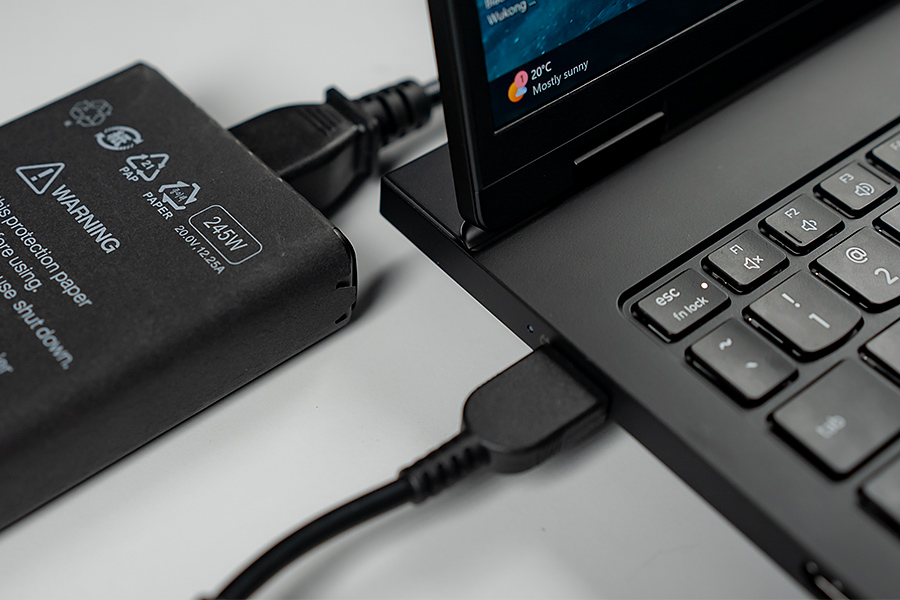
Okay, so talking about the battery life, things get a bit disappointing. I was only getting around 3 hours of screen time doing everyday stuff like browsing the web, editing documents, and watching YouTube videos. So yeah, if you're planning to use this out without a charger, you'll definitely need to find a plug pretty soon!
Performance
- AMD Ryzen 7 8745HX CPU
- NVIDIA RTX 5060 GPU (115W)
- 24GB DDR5 RAM (1x 24GB)
Now talking about performance, I was really excited to test the new Ryzen chips and see how they perform in real-world. To start, I ran Cinebench 2024 in both Custom and Performance modes on the Legion, and here are the results.
As mentioned earlier, I’ll also compare these results with the Acer Predator Helios Neo 16S AI to see how both laptops perform.
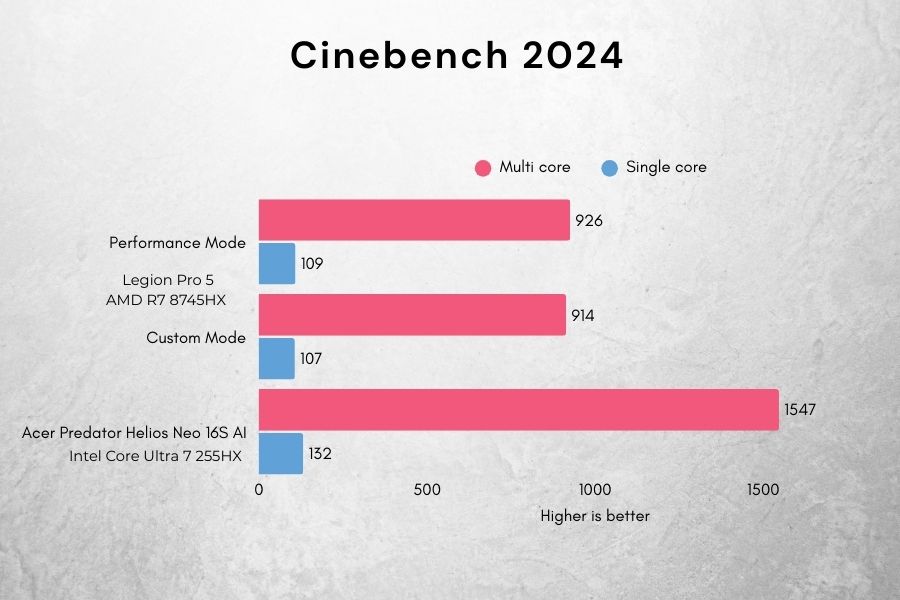
Looking at the Cinebench results, the Acer Predator Helios Neo 16S AI easily outperforms the Legion Pro 5 by a mile. In multi-core performance, the Predator scores 1547 compared to the Legion’s 926 in Performance Mode, which is about 67% higher. For single-core, the Predator’s 132 is roughly 21% higher than the Legion’s 109. So yeah, it's clear that the Predator handles heavy workloads noticeably better than the Legion Pro 5.
GPU Benchmarks
Talking about the GPU, we get NVIDIA RTX 5060 on this laptop, which comes with just 8GB of VRAM, a 128-bit memory bus, and 3328 CUDA cores.
To compare the raw GPU performance, I ran both the Fire Strike Extreme and Time Spy benchmarks.
Looking at Fire Strike Extreme, the Legion Pro 5 scores 14,970 in Custom mode and 15,330 in Performance mode, while the Acer Predator Helios Neo 16S AI scores 14,530. That means the Legion is about 3% higher than the Predator in Custom mode and about 5% higher in Performance mode.
Looking the score for the Time Spy, the Legion scores 11,862 in Custom and 12,059 in Performance mode, while the Predator scores 12,751. This shows that the Predator is roughly 7% faster compared to Legion in Custom mode and about 6% faster in Performance mode respectively.
So overall, the GPUs are very close, with the Legion slightly ahead in older DirectX benchmarks like Fire Strike Extreme, while the Predator takes a slight lead in newer benchmarks like Time Spy.
Gaming
Okay, let's talk about how they perform in gaming…
I’ll be comparing the Acer Predator Helios Neo 16S AI with the Legion Pro 5, but first, I want to share my experience with the Legion. I played two games in both Custom and Performance modes. Interestingly, in Performance mode, the fans don’t ramp up as much as they should, which causes the CPU temperatures to climb higher. In Custom mode, I set the fans to max, keeping the CPU much cooler.
As we can see, there isn’t a huge difference in FPS between the two different modes, but when it comes to CPU temperatures, you can see that in Performance mode, the CPU easily goes above 90°C.
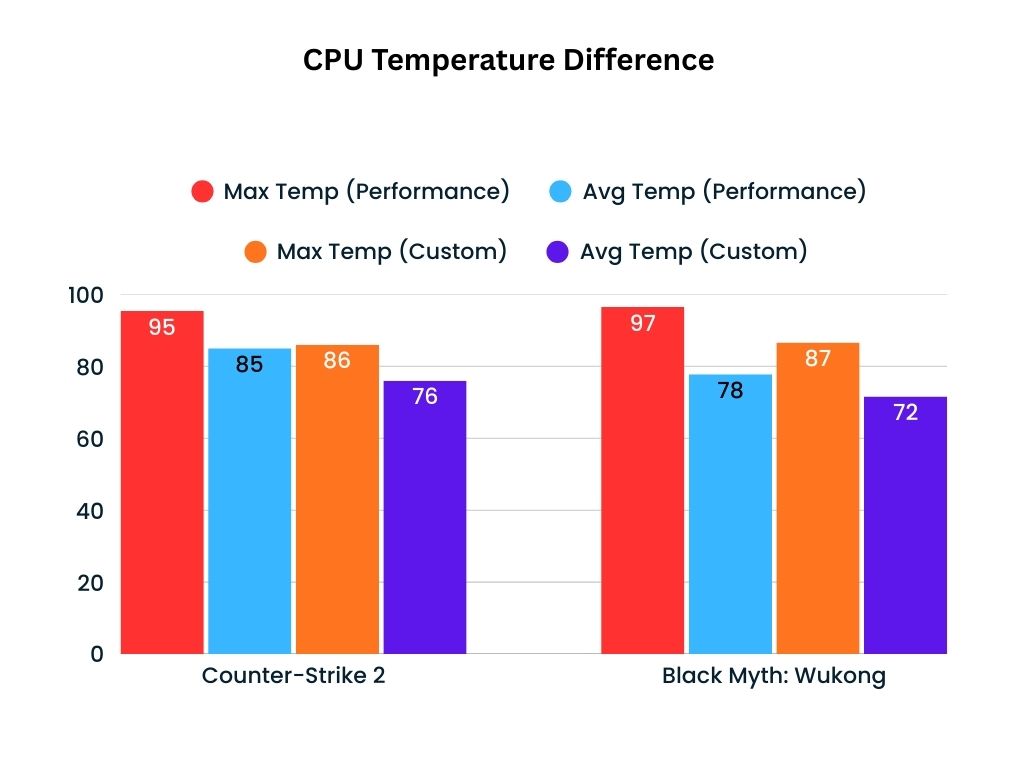
So yeah, based on these results, I ended up playing all the games below in “Custom Mode”, with the fans set to max.
Looking at the results, you can see that the Acer Predator hits a higher average FPS in both CS2 and Cyberpunk 2077. However, the Legion Pro 5 maintains much stronger 1% lows, which makes gameplay feel smoother and more consistent. I did play Cyberpunk 2077 without DLSS on both laptops, and they were just unplayable. Thank God these new NVIDIA chips have frame-generation technology, which helps boost FPS significantly.
Lenovo Legion Pro 5 (2025) review: Conclusion
So yeah, all in all, the Legion Pro 5 (AMD) is a solid midrange gaming laptop. Where you get a sleek design, a gorgeous OLED display, a fantastic keyboard, and good overall performance, making it a perfect choice for Legion fans out there.
That said, its closest competitor is the Acer Predator Helios Neo 16S AI, which usually costs a bit more at around NPR 255,000. However, it often gets good discounts, and if you catch one, you can get it for a similar price. In that case, you are getting a much faster CPU and a smoother 240Hz display. Plus you get three years of warranty in Predator compared to two years in Legion.
In the end, the Legion still offers more RAM and storage, so the decision comes down to whether you want extra performance or more memory and storage.

Lenovo Legion Pro 5 (2025) review: Pros and cons
| Pros | Cons |
| A gorgeous OLED display | No biometric login option |
| Powerful performance | Attracts a lot of fingerprint smudges |
| Sleek design | Average trackpad |
| A satisfying keyboard + Numpad | Poor Battery Life |
Article Last updated: December 9, 2025