I feel you, the process of buying a good computer is a tiring work. It can be a very crafty job to find the right computer with the right specifications that will work for you. Because everyone's different needs. Of course, if you have extra cash to throw around, you could get yourself a very high-end computer and not worry about it. However, most of us have a limited budget to spend on computers.
Choosing the right processor is one of the most important and tricky things because unlike RAM and Hard Disk, you can't judge a processor by just numbers. There are a lot of other factors like Cache, Hyper-threading, Cores to consider. Plus, money is also another essential element because the processors are expensive. If you don't need a very powerful processor, why waste your hard earned money on it?
So, how do you choose which processor to buy? Don't worry, I will guide you thoroughly in this article. After reading this post, even a non-technical person can find choosing the best-fit-for-your-need processor to be an easy-peasy job.
First of all, if you live Nepal, you can choose from two brands: AMD or Intel. However, Intel is more readily available in the market. Therefore, I will be talking about Intel processors only (I don't want you to be more confused. So, let's stick with Intel).
Intel has it's Core I series of processors, with a total of four variants, three of them readily available in Nepal. If you are confused, the Core i3, Core i5, and the Core i7 are the common ones. While the Core i9 is both more powerful and is just the best, they are pretty expensive.
HOW TO IDENTIFY GENERATIONS
Before you know how to identify the generation of a processor, you should note that in today's age, i.e 2018 you should not buy anything that isn't 8th Gen or higher. Even when you get a chance to buy a last-gen Core i7 vs a current-gen Core i5, get the latest one. While this seems pretty easy there is a lot of other things you need to consider.
1. Look at the Intel sticker (simple as that!)
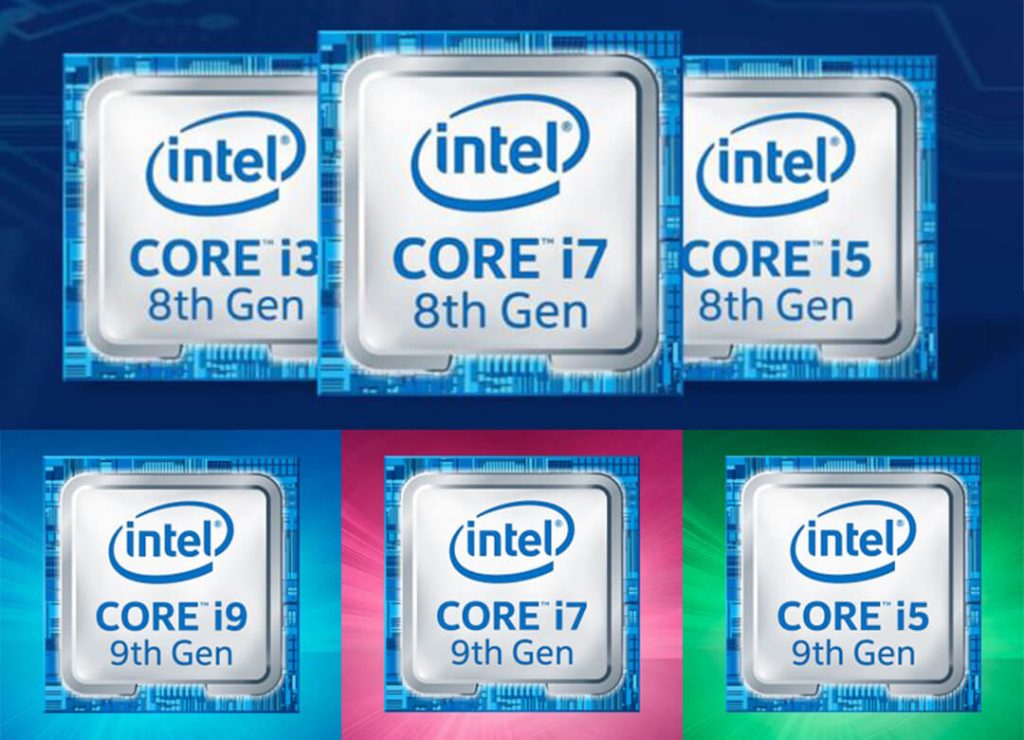
For starters, as long as you are not buying an old processor, the generation is written right on the little sticker that comes with your laptop. If you are a desktop person, the packaging will have the generation written all over it. You will also get a sticker with the packaging for desktops while the sticker on laptops come pre-installed.
2. Look at the processor serial number.
For this, you need to boot the computer and look at the computer properties. There you will see processor numbers.
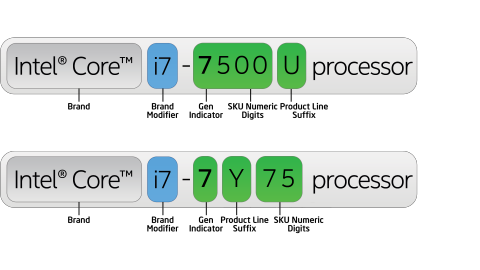
The number after i3, i5 or i7 is the generation. For instance, in the picture above, the processor names are "Intel Core i7-7500 U" and "Intel Core i7-7Y75"; the number 7 after i7 means it is a seventh-generation processor. If it was 6th generation, the processor number would be "Intel i7 6XXXX"
Now that the problem of identifying the generation is resolved, let's look at the difference between i3, i5 and i7.
Difference Between i3, i5 and i7
No, the numbers 3, 5 and 7 don't represent the number of cores or processing speed (GHz). These numbers just show the relative performance based on the number of cores, clock speed (in GHz), the size of cache memory, Turbo Boost and Hyper-Threading. Well, in short i7 is better than i5, which in turn is better than i3.
Number of Cores: i3 has two to four cores, i5 has 2 to 6 cores and i7 has 2 to 8 cores. A higher core count doesn't mean better performance. If an application is capable of utilizing multiple cores, that is the only way more cores help. Intel has introduced features like Hyper-Threading and Turbo Boost that cannot be overlooked. But, the size of cache memory matters as well.
Hyper-threading: Thread is a process in simple term. Usually, one core can perform one task (thread) at a time. But with hyper-threading, Intel can process two tasks in a single core. Which means the two physical cores act as four cores (virtual), thus increasing speed. So, your dual-core i3 will act like it has four cores.
The Intel Core i3 series and the Intel Core i7 series support hyper-threading. The Intel Core i5 series (quad-core) does not support it (But, remember physical cores are better than virtual cores).
Turbo Boost: If you buy i5 or i7, your processor can increase its clock speed (GHz) when needed. This is called Turbo Boost by Intel. For example, if you are playing a game and your system requires some extra power, Intel processor will activate Turbo Boost to make the game run smooth. Unfortunately, i3 doesn't support Turbo Boost.
Cache Memory: Cache is a memory (like RAM) inside the processor. So, the greater the cache memory size, the better the processor will perform. i3 has 3 to 8MB of cache, i5 has 3-9MB, i7 has 4-12MB cache and the latest Core i9-9900k has 16MB of cache.
I know, this all sounded too techie and you are still confused. You are probably still wondering...which one do I buy?
Alpha Suffix
This is the most important part of your buying decision. You might have noticed a letter or two at the end or somewhere in the middle of your processor's serial number. That is your processor's Alpha
The last letter in the processor number describes how your processor would perform and the list of features it gets. It also defines the processor's TDP, which is also pretty important as well. Let's look at a few common suffixes and what they mean for you. I will keep it as simple as possible.
| Alpha Suffix | Description |
| K | Desktop CPU Unlocked Overclockable Performance-oriented Usually has a TDP of 95W Targeted Eg: i9-9900k |
| HK | Laptop CPU Unlocked Overclockable Performance-oriented for laptops TDP of 45W Eg: i9-8950HK |
| H | Laptop CPU TDP of 45W Performance Oriented TDP of 45W Up-to 6 Cores Eg: i7-8750H |
| HQ | Laptop CPU Quad-Core Processors TDP of 45W Fairly outdated at this point Eg: i7-7700HQ |
| G | Laptop CPU Includes descrete Graphics Eg: i7-8809G |
| U | Laptop CPU Ultra-low power TDP of 15W Ultrabook oriented Best of usable power and battery efficiency Eg: i7-8550U |
| Y | Laptop CPU TDP of 4.5W Fan-less design Best for ultralight laptops Battery efficiency at it's best Extremely low power Eg: i7-7Y75 |
Which processor type is best for you?
First of all, it depends on what you plan to do with your system (laptop/PC). But, worry not! I will tell you more about processor types and the tasks it can do.
i3 - Good for basic tasks with decent multitasking. If all you do on your computer is surf Internet, use Word, Excel etc., play simple games, and make video calls, then i3 is for you. You will get a cheap computer for all your needs.
i5- This is good for someone who is Intermediate and active user (someone who wants to do simple video editing, graphics designing). Good for gaming if it has integrated graphics. Basically, if you want better performance at a cheap price, go for i5. In my opinion, this is the best choice because you never know when your needs might increase.
i7 - This is for the power users. It is similar to the flagship phones. It performs very good but is expensive. If you don't need to do high-end video rendering, well, don't waste your money (if you have a limited budget, that is).
i9 - The best processor Intel makes for us consumers. Packed with enough power to do almost anything, this is pretty much as good as it gets. If you have the money to buy one, be prepared to spend more on cooling solution.
TDP (Thermal Design Power)
TDP basically means the power a processor needs to work properly according to Intel's definition of high-complexity workload. Although the TDP only shows the watt consumption under base frequencies.
If you see anything less than 25W, it's oriented towards battery life and portability. Anything around 50W are powerful processors, but not fully committed. Above that is basically all performance performance performance.
Conclusion
So, just to summarize everything, always try and buy the latest gen processor rather than going after Intel's absurd naming schemes. If you are still confused, just look at the processor's TDP (Thermal Design Power). If you do finally choose a processor, just look at a few reviews before you actually make a purchase.
Hope this loooong post helped clear your dilemma.
So, which processor will you be choosing while buying a computer? Let us know in the comments below.
Article Last updated: November 25, 2025