Why Trust Gadgetbyte?
At Gadgetbyte, we invest substantial hours into rigorously testing each product or service we review, guaranteeing that you make informed purchases. Learn more about our testing process.
Review Overview
Design and Build
8/10
Display
9.9/10
Keyboard
8/10
Performance
7.5/10
Audio
7/10
Webcam
9/10
Battery
6/10
Value for Money
8/10
The Acer Swift Go 14 (2024) featuring the Ultra 5 125H processor is a fine laptop for everyday tasks, some level of photo and video editing, and just a bit of gaming. The incredible display, good build, great camera, and decent performance make it a good choice, but it comes at a cost of inferior battery life.
It’s always a hassle when you want a day-to-day laptop. There are many things to consider when choosing the right one. But that’s what we are for. And for the past week, I've been using the Acer Swift Go 14, and there is just one issue with this laptop, that being the battery life. So, let’s really get into the review of the Acer Swift Go 14 now.

Acer Swift Go 14 (2024) Specifications:
- Dimensions: 312.9 x 217.9 x 14.9 mm
- Weight: 1.32 kg
- Display: 14″ 2.8K OLED panel, 90Hz refresh rate, 100% sRGB colour gamut
- Processor: Intel "Meteor Lake" Ultra 5 125H (Intel 4 process)
- 14C/18T, 4.5 GHz max turbo frequency
- Graphics: Intel Arc Graphics
- Memory: 16GB LPDDR5X RAM, 512GB PCIe Gen4 SSD
- Ports: 2x USB 3.2 Gen 1 Type-A, 2x USB 3.2 Gen 1 Type-C, 1x HDMI 2.1, 1x 3.5mm combo audio jack
- Battery: Li-Ion 65 Wh battery (Charges via a 100W Adapter)
- Webcam: 1440p QHD Camera
- Audio: Stereo Speakers
- Keyboard: White Backlit Keys
- Touchpad: Windows Precision Touchpad
- Security: TPM 2.0 chip, Windows Hello
- Price in Nepal: Rs. 118,000 (see full specs)
Acer Swift Go 14 (2024) Review
Design and build
- 312.9 x 217.9 x 14.9 mm, 1.32 kg
- 180-degree hinge, plastic trackpad
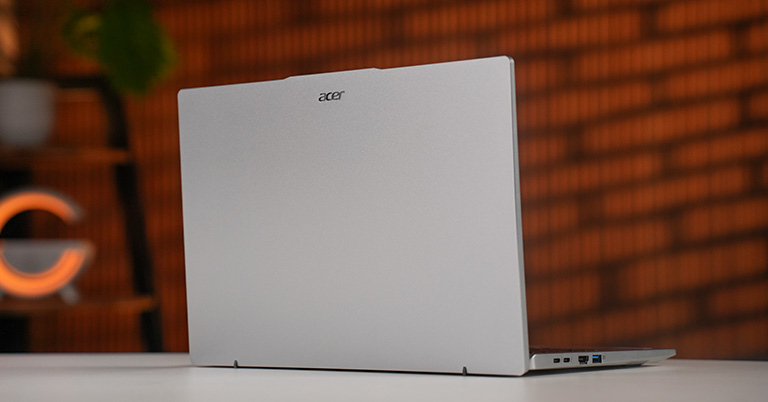
Starting with the looks and feel, it has a nice aluminum unibody chassis, and just holding it in my hand felt premium and super lightweight. It pretty much has no flex at all, which is always a win. The device feels quite sturdy, and not to mention, it didn’t leave a single fingerprint mark when I opened the lid or just held it.
It’s also nice of Acer to include a hinge that supports one-finger opening. What I also like about this laptop is the ErgoLift-style hinge. This self-elevating design lifts the rear of the laptop for better airflow, and honestly, it just looks better.
I would say the port selection is decent; it gets the job done. Most users really just need two USB Type-A ports for plugging in a mouse and a keyboard. The USB-C ports take care of data transfer, there’s a 3.5 mm jack for headphones, and HDMI 2.1 for an external display. There is also the Kingston lock if you care, though I doubt anyone is using it.
However, you lose one USB-C port when using the device while charging, as it does not have a dedicated charging slot.
Display
- 14-inch 2.8K (2880 x 1800) OLED panel
- 100% sRGB, 90Hz
I think the main highlight of this laptop is the OLED display. You know you won’t be disappointed by the display when you are viewing a crisp OLED panel with a smooth 90Hz refresh rate. The colors remain consistent regardless of brightness level. However, the screen looks more “punchy” and vivid at high brightness. And I am not a big fan of the glossy display, but I mean, who can’t handle these minor issues when you’re getting an OLED display.
Judging by the above test, the contrast improves significantly at higher brightness because brightness increases, while black stays the same. The white point numbers (6400K–6700K) are very close to the standard daylight white (6500K), further demonstrating color consistency. Though it does not reach exactly 400 nits as advertised. The color gamut coverage is also outstanding, achieving 100% sRGB, 98% AdobeRGB, 100% P3, and 96% NTSC, ensuring accurate color and making the display particularly well-suited for creative tasks like photo editing, video production, and graphic design.
Keyboard and trackpad
- Single white backlit keys
- Windows Precision Trackpad with touch-sensitive control panel for media playback
There is nothing much to talk about the keyboard. Typing in it felt just good, nothing more or nothing less. The backlit keys are also not surprising, as they are now very common and a must-have in every laptop. The same goes for the trackpad, but it does come with one niche feature. That feature is the touch-sensitive control panel that appears on the touchpad itself when media is playing. It feels more like a gimmick than a practical use, but it does come in handy a few times.
Webcam, Audio and Battery Life
- 1440p QHD camera
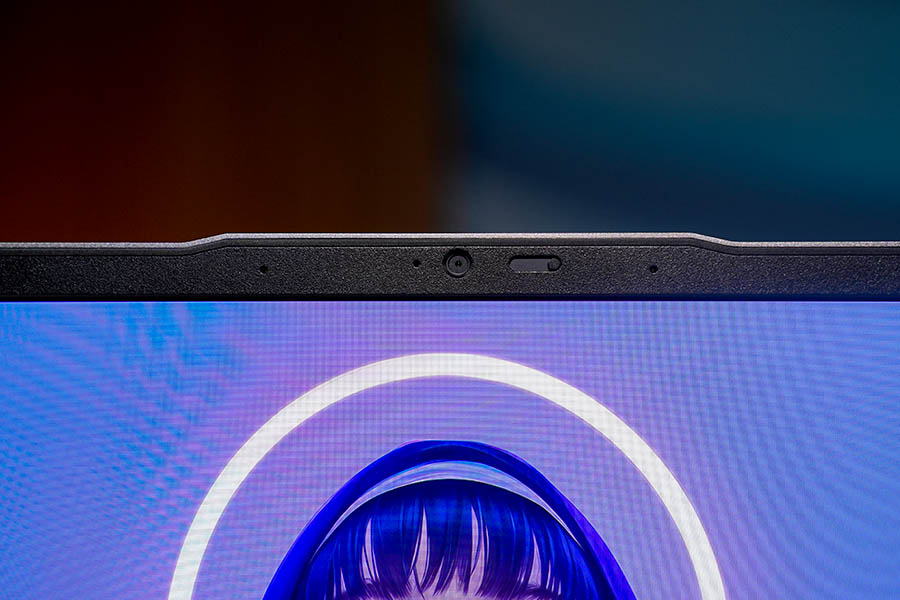
Oh boy, the camera is just great. Usually, I am disappointed by the cameras in laptops, but this one did not disappoint. There is also not much reflection when you are exposed to light. However, if we had to compare the quality to, say, a MacBook M3, it lags a bit behind. Nevertheless, I would want this kind of webcam in any laptop that I use.
Similarly, the microphone quality was also not bad at all. Though the speakers weren’t so loud, they were enough for casual video streaming or for meetings. But you want a more immersive experience, I would suggest you get a headphone or a good speaker.
Where this laptop does not shine is the battery life. I booted the laptop with a full charge and worked casually, but it only lasted about 5 hours. You hear me, “5” hours for a laptop made for productive tasks. This puts it in the same league as power-hungry gaming rigs that aren't even optimized for efficiency. Another problem is the heating issue: whenever I'm plugged in, the laptop heats up, which is very concerning.
Performance
- Intel Core Ultra 5 125H
- 16GB DDR5, 512GB NVMe PCIe M.2
The ultrabook was pretty good. I mean, this is a productivity device, so there aren’t many things to check. That being said, it’s not bad in any way. I didn’t face any underperformance from it. It handled my everyday tasks, which include browsing the internet, editing photos, and just writing.
The dedicated NPU in this new Ultra processor can be quite useful if you plan on generating any AI content, but I doubt any normal person will be using it to the fullest.
A few benchmarks
The Cinebench scores are decent; this processor is not designed for high single-core speed, and the multicore scores are also standard. Overall, the benchmark concludes that this CPU is suitable for office work, coding, or browsing. However, what they are not great at is heavy 4K video editing or playing AAA games. The CrystalDisk benchmark provides us with information on large-file speeds, which are suitable for copying game files and movies. It also shows great speed for app loading and OS boot time, although this speed is normal for NVMe drives.
I even tried Valorant, and it ran without any stuttering. But, if you plan to play the game on low settings to get higher frame rates, I suggest you cap it at 90 FPS, since you might experience screen tearing.
Acer Swift Go 14 (2024) Review: Conclusion
The Swift Go 14 is an impressive laptop; it’s thin and light, it has a great display, and it performs well. So, for whom is this laptop? I would say it’s for anyone who wants a simple, all-in-one device, mainly students or business personnel. I think the only major downside of this laptop is the battery life.
However, if you really need a laptop with excellent battery life, I would suggest the Acer Swift 14 with the Ultra 7 226V, which costs slightly more but is better in all respects except the display. The MacBook Air M2 is also a good choice.

Acer Swift Go 14 (2024) Review: Pros and cons
| Pros | Cons |
|---|---|
| Stunning Display | Glossy display can cause minor reflections |
| Decent port selection | Very poor battery life |
| Great 1440p QHD webcam | |
| Extremely lightweight |
Article Last updated: December 8, 2025