The Nothing Ear (3a) has plenty to offer, but does it get the basics right? Here's what I found after two weeks of testing.
Why Trust Gadgetbyte?
At Gadgetbyte, we invest substantial hours into rigorously testing each product or service we review, guaranteeing that you make informed purchases. Learn more about our testing process.
Review Overview
3.6
Design and Comfort
9/10
Controls and Customization
9.5/10
Noise Cancellation
8/10
Sound Quality
6.5/10
Call Quality
4/10
Battery Life
7/10
Value for Money
6/10
The Nothing Ear (3a) has a lot going for it, including a unique design, comfortable fit, and excellent customization features. But does it deliver where it matters most? After two weeks of testing, I found plenty to like, along with a few shortcomings that are difficult to ignore.
It's been two years since Nothing introduced the Ear (a), and I was pretty excited to try its successor, the Ear (3a). After using these earbuds for over two weeks, I have mixed feelings about them.
At Rs. 13,999 in Nepal, the Ear (3a) brings Nothing's signature transparent design, an excellent equalizer, and some unusual recording features. But while there's plenty to like here, a few things left me questioning whether they're actually worth buying.
Nothing Ear (3a) Review: Specifications
- Design: In-ear TWS, 4.53 grams per earbud, IP54 rating (earbuds)
- Audio: 12mm dynamic drivers, LDAC, Hi-Res Wireless, Spatial Audio
- Noise Cancellation: Adaptive ANC up to 45dB, Transparency Mode
- Connectivity: Bluetooth 6.0, dual-device connection
- Battery: Up to 10 hours (earbuds), 42 hours (with case), AAC with ANC off
- Charging: USB-C, fast charging support
- Features: Audio Snapshot, Advanced EQ, Nothing X app
- Colors: Black, White, Yellow, Pink
Nothing Ear (3a) Price in Nepal


Nothing Ear (3a) Review:
Design and Comfort
- Transparent design
- IP54 dust and water resistance
- Lightweight earbuds weighing 4.53 grams each
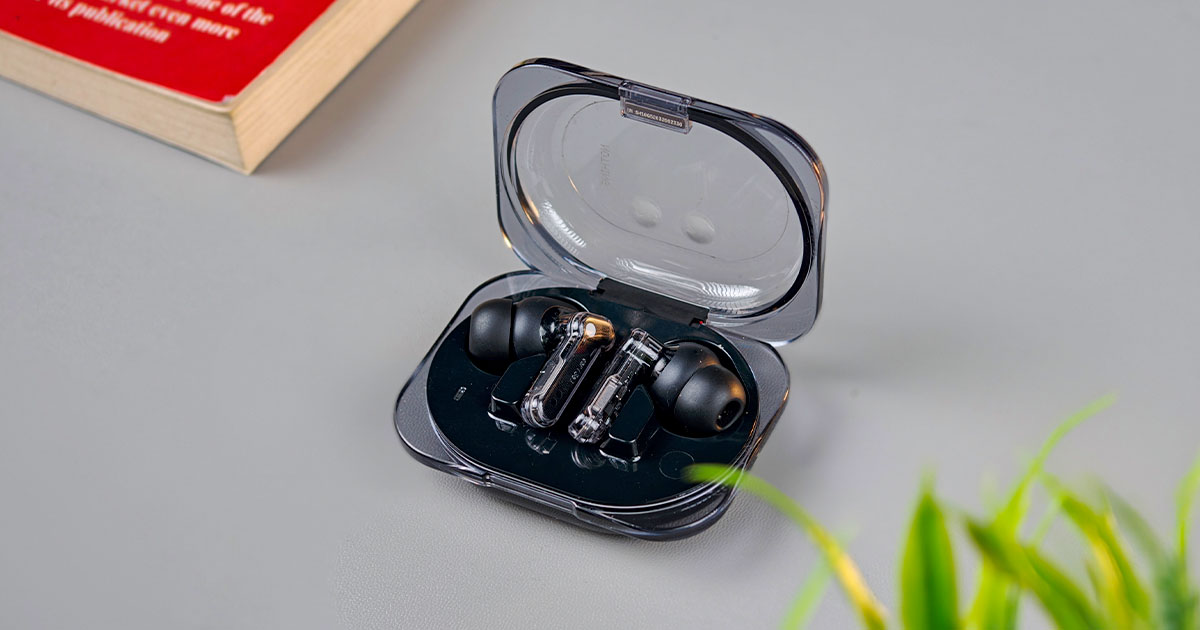
I've been using the black Nothing Ear (3a) alongside my black Nothing Phone 3, and the combination looks pretty cool. Both devices share that familiar transparent design language, which is something I've always enjoyed about Nothing products. The earbuds themselves have transparent stems, while the case comes with a transparent lid that lets you see the buds inside. It's a design that still looks fresh to me, even after seeing it on several generations of Nothing earbuds.
There are four colour options this time: black, white, yellow, and pink. Although the black version matches my phone nicely, if I were choosing again, I would probably go with the white or yellow. Those two colours look more playful, and I prefer them over the rather subtle black finish.
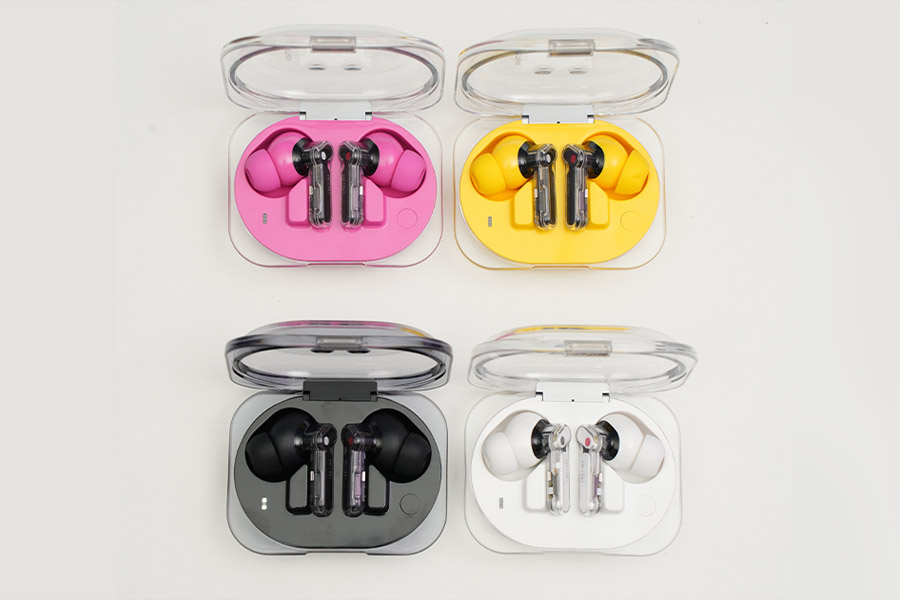
Comfort hasn't been an issue either. Each earbud weighs just 4.53 grams, and there have been several occasions when I completely forgot I was wearing them. Most of my listening happens while working at the office, where I sometimes keep earbuds on for hours, and the Ear (3a) has been comfortable throughout. You also get four pairs of silicone ear tips in the box, ranging from XS to L. The medium tips come preinstalled, and they fit my ears well enough that I didn't bother changing them. They're also IP54-rated for dust and splash resistance, which is useful for regular outdoor use or light exercise.
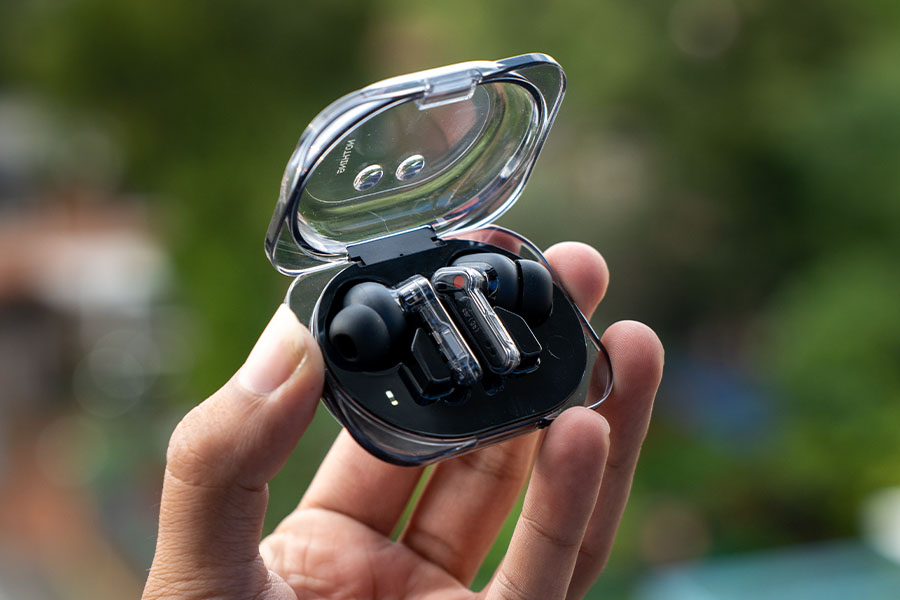
Another detail worth mentioning is the three-segment LED indicator on the charging case. Nothing has brought some of its familiar light-based design ideas into the earbuds case, and the LEDs display battery level, charging progress, and pairing status through different patterns. It's a small addition, but definitely more informative than a regular single LED. Between the transparent design, lightweight fit, and little details on the case, I don't have much to complain about here.
Audio Snapshot: Weird but Useful?
Audio Snapshot is one of the more interesting additions to the Ear (3a), and I spent some time playing around with it. You can pinch both earbuds simultaneously to record up to 60 seconds of audio playing through your connected device. There's also an option to capture the previous 30 seconds, which is useful when you hear something important and realise a little too late that you wanted to save it. Once recorded, the clips appear in the Nothing X app, where you can replay, share, or transcribe them into text.
I was especially curious about how well the transcription would handle Nepali, alongside English and Hindi. And surprisingly, Nepali worked quite well. When the speech was clear and the words were pronounced properly, the transcription was accurate enough to be useful. But once I started using more slang words or speaking less clearly, it had a harder time understanding what I was saying. So, it's not perfect, but I was still impressed by how well it could handle normal Nepali speech. I can see this being handy for saving useful parts of a podcast, a lecture, or something important you've heard. There's also a separate call-recording feature that can save up to two hours of conversations in supported regions, with a recording notification for participants.
The only thing I'm not too happy about is the transcription allowance. Nothing provides three months of free Pro Transcription with 120 minutes available each month. The Pro service also supports features like summaries and speaker identification, but the long-term subscription pricing hasn't been clearly explained on its product page. There's a standard transcription option as well, although it doesn't offer everything included in Pro. I wouldn't buy these earbuds just for Audio Snapshot, but it's a clever addition, and I can see myself using it occasionally.
Nothing Ear (3a) Sound Quality
- 12mm dynamic drivers
- LDAC and Hi-Res Wireless support
- Customizable sound through Nothing X
The first thing I noticed about the Nothing Ear (3a) was its aggressive bass-heavy tuning. Nothing has gone with the popular V-shaped sound signature, but with noticeably more emphasis on the bass than the treble. Even with the default "Balanced" preset, the low frequencies are quite overpowering, which can be enjoyable if you're into electronic music. For example, when I played OVERCLOCK by Kevin de Vries, the main drop had a satisfying punch, and I had a similar experience with MONTAGEM SAHARA by Rushex. The strong bass and prominent treble made these tracks sound energetic and fun.
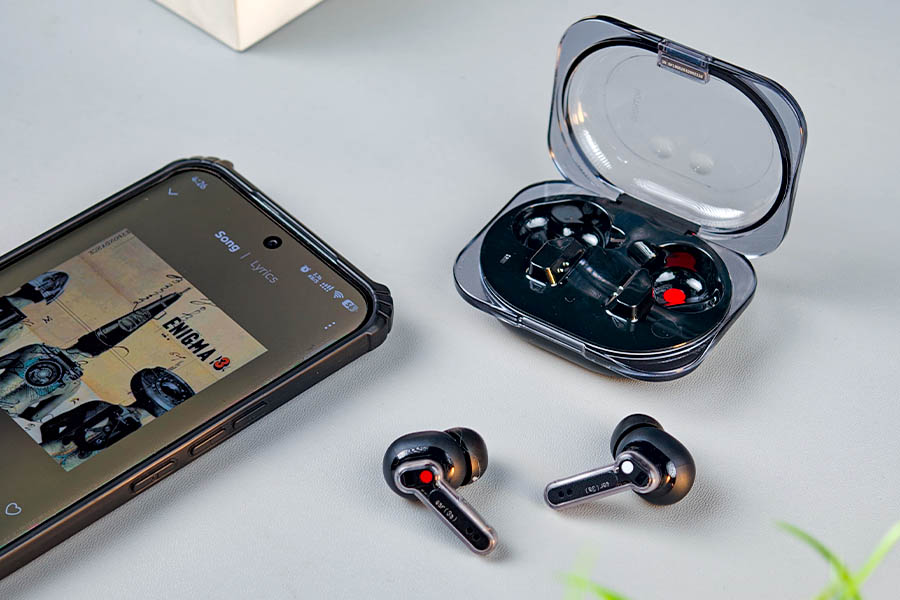
But my music library isn't limited to phonk and techno, and that's where things start falling apart. The Nothing Ear (3a) puts so much emphasis on the low frequencies that the mids often get overshadowed. As a result, vocals and instruments like guitars struggle to stand out, especially when there's a strong kick drum or bassline playing in the background. I particularly noticed this while listening to rock and classic rock, including Mero Prem by Axix Band. The bass felt a little too dominant, while the vocals and guitar work lacked the clarity and separation I was looking for. I had similar experiences with indie rock, lo-fi, folk, and acoustic music, where the overall sound often felt too boomy and muddy.
I also tried switching between the different sound presets, but none made a significant improvement. Even with the Balanced preset enabled by default, the bass remained overpowering, pushing vocals and instruments into the background.
And that's my biggest issue with the Nothing Ear (3a). Its bass-heavy tuning works well for electronic music, but across other genres, the recessed mids leave vocals and instruments sounding muddy. Nothing's Advanced EQ can improve things considerably, but at almost Rs. 14,000, I expected better sound straight out of the box.
Nothing X App and Customization
- Simple and Advanced EQ
- Eight-band equalizer with Q-factor control
- Community EQ sharing
If there's one thing that kept me interested in the Ear (3a), it's the Nothing X app. The amount of sound customization available here is excellent, and it's easily my favourite part of using these earbuds. Pairing was quick, the app worked smoothly with my Nothing Phone, and the equalizer gives you much more freedom than the basic presets offered by many other earbuds. There are three main sections for customization: Simple, Advanced, and Explore.
Simple EQ
The Simple EQ is where most people should start. You get four preset sound profiles and a custom option that lets you adjust bass, mids, and treble. There's nothing complicated about it, and even someone who has never used an equalizer can easily make changes to the sound. In my case, reducing the bass and bringing the mids forward helped with the muddy vocals I mentioned earlier.
Parametric EQ
The Parametric EQ takes things much further. You get eight adjustable bands with control over individual frequencies, gain, and Q factor. In simple terms, the Q factor decides how narrowly or widely an EQ adjustment affects nearby frequencies. So, if you want to change a particular part of the bass without affecting too much of the surrounding sound, you can do that here.
This is one of the most flexible equalizers I've come across on wireless earbuds. There is plenty of room to experiment, especially if you know what kind of sound you prefer. It's probably more control than most people will ever need, but having the option is certainly welcome.
Explore: Community EQ Profiles
The Explore section is another clever addition. Instead of manually adjusting every frequency, you can import EQ profiles created by other Nothing users. Just scan a QR code, and the exact settings are applied to your earbuds. You can also share your own profiles in the same way, making it easy to experiment with different sound tunings without starting from scratch.
And since I wasn't particularly happy with the default tuning, we've also created our own custom EQ profile that tones down the boomy bass and brings more clarity to the vocals, making the overall sound much more enjoyable across different genres. You can simply scan our QR code to apply the same settings to your Ear (3a), without having to adjust anything manually.
This is something I wish more earbud manufacturers would introduce. Not everyone understands equalizers, and having access to community-created profiles makes sound customization much easier. Between the Advanced EQ and Explore section, Nothing has done an excellent job with its software. I just wish the default tuning sounded good enough that I didn't have to rely on these features so much.
Active Noise Cancellation and Transparency Mode
- Adaptive ANC with up to 45dB claimed noise reduction
- Adjustable ANC levels
- Transparency Mode
Active Noise Cancellation
The ANC on the Nothing Ear (3a) has been quite impressive. During my time at the office, it did a good job of reducing constant background noises, particularly the humming of PC fans and air conditioners. Even with the AC running at higher fan speeds, the earbuds managed to suppress most of the noise, making it easier to focus on music or work without distractions.
Of course, sharper sounds like keyboard clicks, chairs squeaking, and nearby conversations can still make their way through. But that's fairly common with ANC earbuds, and I wouldn't consider it a major drawback. What matters more is how effectively the Nothing Ear (3a) handles continuous background noise, and in that regard, I think it performs quite well.
Overall, I'm satisfied with the ANC performance and would rate it 4/5. It's effective enough for everyday office use and does a good job of keeping unwanted background noise to a minimum.
Transparency Mode
Transparency mode has been much more useful to me. I prefer being able to hear what's happening around me without constantly removing my earbuds, and the Nothing Ear (3a) handles this reasonably well. Voices sound fairly natural, and surrounding sounds such as people talking or vehicle horns come through clearly. More importantly, the microphones don't make everything sound unnecessarily loud or robotic. It feels comfortable enough to leave enabled when I need to stay aware of my surroundings.
There was one issue when I first started using the earbuds. Transparency mode occasionally produced a static-like noise, which was quite irritating. Fortunately, after a firmware update, that problem seems to have been fixed. Since then, I haven't noticed the same issue during regular use. Overall, I'd rate transparency mode 3.8/5. It's useful for everyday conversations and staying aware of my surroundings, although there's still some room for improvement.
Call Quality
- Six microphones, three on each earbud
- Environmental noise cancellation for calls
Call quality has been disappointing, especially after testing the earbuds more thoroughly in different environments. In quieter surroundings, my voice sounded fairly natural, and I could make calls without much trouble. The microphones also managed to reduce some background noise, so regular conversations were generally understandable.

However, things started falling apart in noisier environments. While the microphones tried to suppress surrounding sounds, they often ended up cutting off parts of my voice in the process. This happened a little too frequently, making my speech sound choppy and unnatural. So, even though the earbuds were trying to keep background noise out, they were also affecting the clarity of my voice, which defeats the whole purpose of noise reduction.
I expected much better microphone performance at this price, especially when taking calls outdoors or in busy environments. I'd rate the call quality 2/5. It's manageable in quieter places, but the aggressive noise reduction and frequent voice cutouts make the Nothing Ear (3a) difficult to recommend for people who take a lot of calls.
Battery Life and Charging
- 55mAh battery per earbud, 500mAh charging case
- Up to 6 hours with ANC off or 4.5 hours with ANC on using LDAC
- USB-C charging and fast charging support
One thing worth mentioning before getting into the battery results is that I kept LDAC enabled throughout my testing. LDAC is a higher-bitrate Bluetooth audio codec, and it generally consumes more battery than AAC. So, the numbers I'm sharing here aren't directly comparable to Nothing's advertised 10-hour playback figure, which is measured using AAC with ANC disabled. Most of my listening happened during my commute and at the office, with different noise-control modes enabled depending on where I was.
Nothing Ear (3a) Battery Drain Test: LDAC Enabled
| Usage Scenario | Duration | Battery Consumption |
|---|---|---|
| Transparency Mode (Commute) | 30–35 minutes | 8–12% |
| Music Playback (ANC On) | 1 hour | 15% |
| Movie Playback (ANC Off) | 3 hours | 43% (100% → 57%) |
Nothing Ear (3a): Claimed Battery Life
| Codec | ANC | Earbuds Only | With Case |
|---|---|---|---|
| LDAC | Off | 6 hours | 28 hours |
| LDAC | On | 4.5 hours | 20 hours |
| AAC | Off | 10 hours | 42 hours |
I haven't conducted a full 100%–0% battery drain test, but based on my everyday usage with LDAC enabled, I've been satisfied with the battery life.
Charging
As for charging, the Nothing Ear (3a) took around 1 hour and 25 minutes to fully charge from 0 to 100% during my testing, which is fairly reasonable. Nothing also claims that a quick five-minute charge can provide up to an hour of playback with ANC disabled. However, in my testing, a five-minute charge delivered around 55 minutes of playback with ANC turned off.
Nothing Ear (3a) Review: Conclusion
After over two weeks with the Nothing Ear (3a), I can confidently say that Nothing has nailed some things while missing the mark on others. The design is excellent, the earbuds are comfortable, ANC works quite well, and the Nothing X app offers some of the best sound customization options I've used. But the two things that matter most to me, sound quality and call quality, simply aren't good enough for the price. The default tuning is overly bass-heavy, leaving vocals sounding muddy, while the aggressive microphone noise reduction frequently cuts off parts of my voice during calls.

And this is where the Realme Buds T500 Pro makes the Ear (3a) a tough sell. I've used both, and I genuinely find the Realme much better sounding straight out of the box. It delivers punchy bass, clearer vocals, and a more enjoyable listening experience across different genres. More importantly, at around Rs. 5,999, it's roughly Rs. 8,000 cheaper.
So, should you buy the Nothing Ear (3a) for Rs. 13,999? For most people, I wouldn't recommend it. If you're a tinkerer who enjoys experimenting with EQ settings or someone invested in the Nothing ecosystem, the Ear (3a) might make sense. But if you simply want great sound without having to tweak anything, I'd save the Rs. 8,000 and get the Realme Buds T500 Pro instead. For everyday listening, it's the better buy, and for me, the choice isn't even close.
Songs referenced in the Nothing Ear 3(a) review:
Nothing Ear (3a) Review: Pros and Cons
| Pros | Cons |
|---|---|
| Unique transparent design | Overly bass-heavy default tuning |
| Lightweight and comfortable | Poor call quality in noisy environments |
| Excellent Advanced EQ | Recessed vocals without EQ adjustments |
| Useful community EQ sharing | Treble can occasionally sound sharp |
| Good ANC and transparency mode | Expensive compared to alternatives |
| Useful Audio Snapshot feature | No wireless charging |
Article Last updated: November 13, 2026