
Why Trust Gadgetbyte?
At Gadgetbyte, we invest substantial hours into rigorously testing each product or service we review, guaranteeing that you make informed purchases. Learn more about our testing process.
Review Overview
4.3
Performance
9.8/10
Audio
9.1/10
Webcam
7.6/10
Battery
6.2/10
Value for money
7.8/10
Asus ProArt P16 feels like every creator's dream machine. Its elegant combo of "RTX 5090" power in such a slim, lightweight design is something I'll forever be impressed by. But of course, all of this comes at a heavy price. Literally.
Design and build
9.4/10
Display
10/10
Keyboard
9/10
Trackpad
7.8/10
RTX 5090!
Yes, that is what Asus managed to pack inside this new ProArt P16 laptop. And it’s somehow lighter than Apple’s 16” MacBook Pro as well? Like… what? Which means if you’re a serious (I mean, serious) creative professional who wants that elegant blend of RTX 5090’s power on a laptop that’s lightweight enough for comfortable everyday carry, the ProArt P16 sure looks like the most obvious choice in the Windows world.
Asus ProArt P16 review: Specifications
- Dimensions, Weight: 246.9 x 354.9 x 14.9 – 18.3 mm (W x D x H), 1.95 kg
- Display: 16″ OLED panel, 4K (3840 x 2400 pixels), 120Hz refresh rate, 100% DCI-P3 color gamut, 600 nits peak brightness, 1,600 nits HDR peak brightness
- Keyboard: Backlit chiclet keys (1.7mm travel)
- Security: Windows Hello face authentication, TPM 2.0
- Processor: AMD Ryzen AI 9 HX 370 (12 cores / 24 threads, up to 5.1 GHz)
- RAM: 64GB LPDDR5X memory
- Storage: 2TB SSD (M.2 NVMe PCIe 4.0)
- Audio: Front-firing speaker system (6 speakers)
- Battery: 90 Watt-hours with 240W charging
- Webcam: FHD (1080p) camera
- I/O Ports: 1x USB4 Type-C (DisplayPort 1.4, Power Delivery), 1x USB 3.2 Gen 2 Type-C, 2x USB 3.2 Gen 2 Type-A, 1x HDMI 2.1, 1x SD card reader, 1x 3.5mm combo audio jack
- Check the full specs of the Asus ProArt P16 here
Asus ProArt P16 price:
| Nepal | India | USA |
| NPR 809,999 | INR 503,990 | USD 5,499 |
Asus ProArt P16 review:
Design and build
- 246.9 x 354.9 x 14.9 – 18.3 mm (W x D x H)
- 1.95 kg, Aluminum build
And starting with design, I’m really digging what Asus has done with this laptop.
It weighs less than 2 kg and measures less than 20 mm thick, making it more portable than pretty much every other 16” gaming laptop I know. The ProArt is actually lighter than Apple’s 16” MacBook Pro—so props to the engineers at Asus for being able to fit a motherflippin’ RTX 5090 GPU inside of this thing!
| Asus ProArt P16 | Apple 16" MacBook Pro |
| 246.9 x 354.9 x 14.9 – 18.3 mm | 248.1 x 355.7 x 16.8 mm |
| 1.95 kg | 2.14 – 2.15 kg |
And because the ProArt P16 is made with creators in mind, of course, it doesn’t have a “loud” visual aesthetic we typically see on a gaming machine. Asus has kept things nice and minimal here, with the most subtle, easy-to-miss branding on the bottom left side of the laptop’s lid.

The choice of build materials is quite interesting too, since Asus went with an all-aluminum build but with a nice soft, ceramic-esque finish that feels quite nice to touch. And as I was dailying this thing, I also noticed how the keyboard deck didn’t even catch any smudges from the moisture from my wrists. That’s pretty cool.
I also love that the ProArt P16 has chamfered edges around the bottom edge of the keyboard, which means I had absolutely no problem working on this thing for hours at a time.
What the port?
But I’ve got some disappointing news in terms of the port situation.
For starters, the ProArt P16 doesn’t have a single Thunderbolt connection since Asus went with an AMD processor. And while that in itself is not a great deal, the fact that it only has one high-speed USB4 connection is a bit concerning. That means whenever I was rocking a multi-monitor setup through its USB4 and HDMI 2.1 port, if I had to transfer files from an external drive at the same time, my only other option would be a slow USB 3.2 Gen 2 port.
Performance
- AMD Ryzen AI 9 HX 370 CPU (15 – 54W)
- NVIDIA RTX 5090 graphics (dedicated)
- 64GB LPDDR5X RAM, 2TB PCIe Gen4 SSD
Let’s get into performance next—and wait—did I mention that this laptop has an RTX 5090 GPU? With 24GB of VRAM? This has been paired with a spacious 64GB LPDDR5X memory and 2TB of PCIe Gen4 SSD with some of the quickest read/write speeds I’ve ever seen.
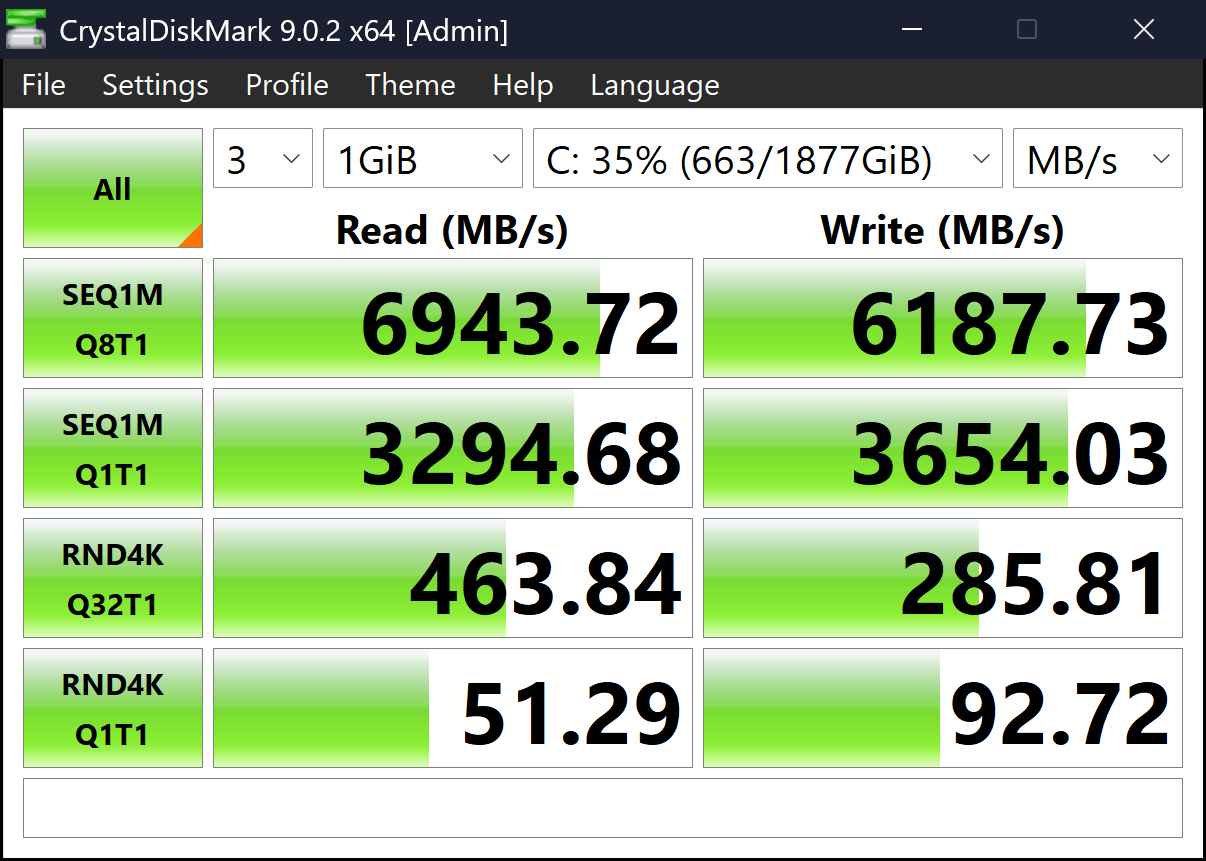
Whereas Asus went with AMD’s Ryzen AI 9 HX 370 CPU here.
| AMD Ryzen AI 9 HX 370 | Intel Core Ultra 9 275HX | Intel Core i9-14900HX | |
| Cinebench 2024 (Single Core) | 116 ↓ | 137 | 129 |
| Cinebench 2024 (Multi Core) | 1093 ↓ | 1693 | 1737 |
| Cores / Threads | 12 / 24 | 24 / 24 | 24 / 32 |
| Maximum Boost Clock | 5.1 GHz | 5.4 GHz | 5.8 GHz |
| Maximum TDP | 54W | 160W | 157W |
And let me give it to you straight, this AMD processor is simply not the fastest out there. It falls quite behind what you get on Intel’s side of the fence, be it in terms of single-core or multi-core performance. But hear me out. I think this is a good thing, actually.
Because I wanna remind you that the ProArt P16 is all about one thing. Power + portability. That slider has to stay in the middle; otherwise, this becomes an Ultrabook or your garden-variety gaming laptop. And obviously, Asus could’ve been prouder of the CPU performance on this thing by opting for Team Blue’s processor, but that would also trigger a domino of downfalls.
Since a more powerful CPU → higher power requirement → lower battery life → beefier cooling system → heavier laptop → a compromise on portability.
A…ll of which has been avoided in one fell swoop here on the ProArt P16 by going with a more efficient AMD chip. And under light casual work that mostly consisted of web browsing and stuff, I was getting 5+ hours of screen time on average. Which simply wouldn’t have been possible with those power-hungry Intel CPUs inside.
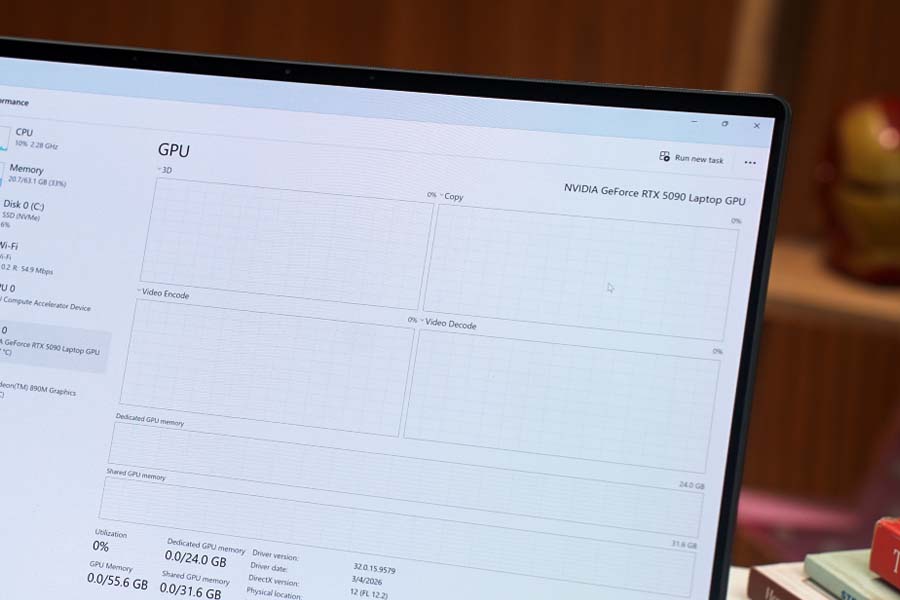
Just so you know, its RTX 5090 GPU isn’t running at its maximum potential on this laptop as well. 'Cause if you look at NVIDIA’s official specs, the power ceiling for RTX 5090 on a laptop is 150W. Which has been limited to just 130W on the ProArt P16.
A 140W system.
So when I maxed out the usage of both CPU and GPU on this laptop, I found that this is a 140W system in total. Against the official claim of 135W of total system power. And all the thermal solutions Asus has thrown inside the ProArt P16—from a vapor chamber to liquid metal thermal compound—turned out to be perfectly capable of cooling this laptop. Without bottlenecking anything. Especially after customizing both of its fans to run at their max speed.
The fan noise remained well in line with what I’d call “bearable” too, since even with both fans running at 100% speed, I measured their noise level at around 50dB only.
But since the ProArt P16 takes in cool air from the bottom and lets the hot air out from the exhaust vent only from the back of the laptop, I did notice that the bottom half of its display gets quite hot under load. The actual keyboard deck where my hands rest stayed perfectly cool and all, but that’s something you need to know about this slim and light beast.
| Pugetbench tests | Score |
| Premiere Pro 26.0 | 106839 |
| Photoshop 27.5.0 | 9771 |
| Lightroom Classic 15.2.0 | 8556 |
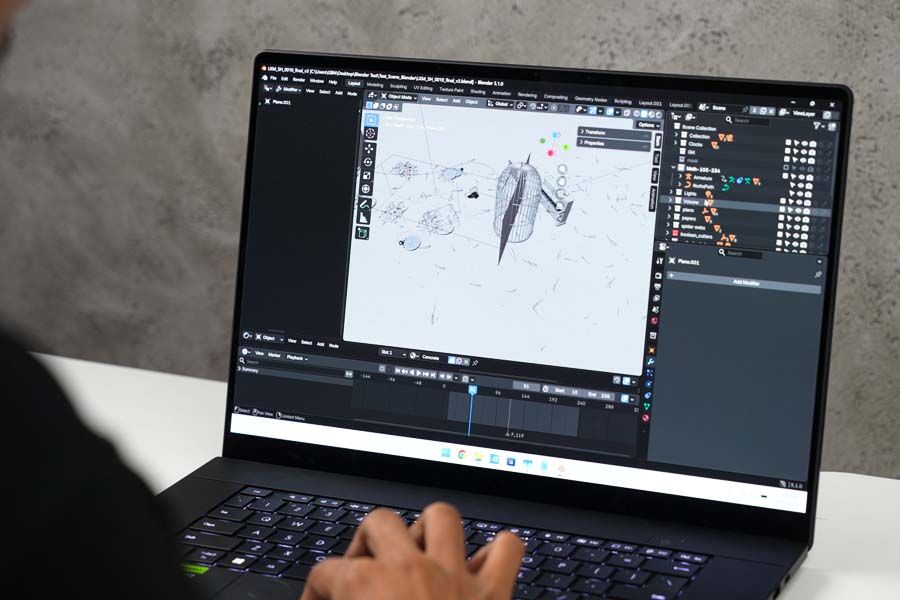
Anyway, as one would expect, there’s no task too complicated, too hard to handle for the ProArt P16. From editing videos on Premiere Pro with multiple 4K layers to rendering complex 3D animations on Blender, I’ve never used a laptop more powerful than this guy. It does need to be plugged in to a power source, and you do need to enable “Performance” mode for the best result—and then—the world is your oyster.
And of course, how could I let go of the ProArt P16 without playing some games?
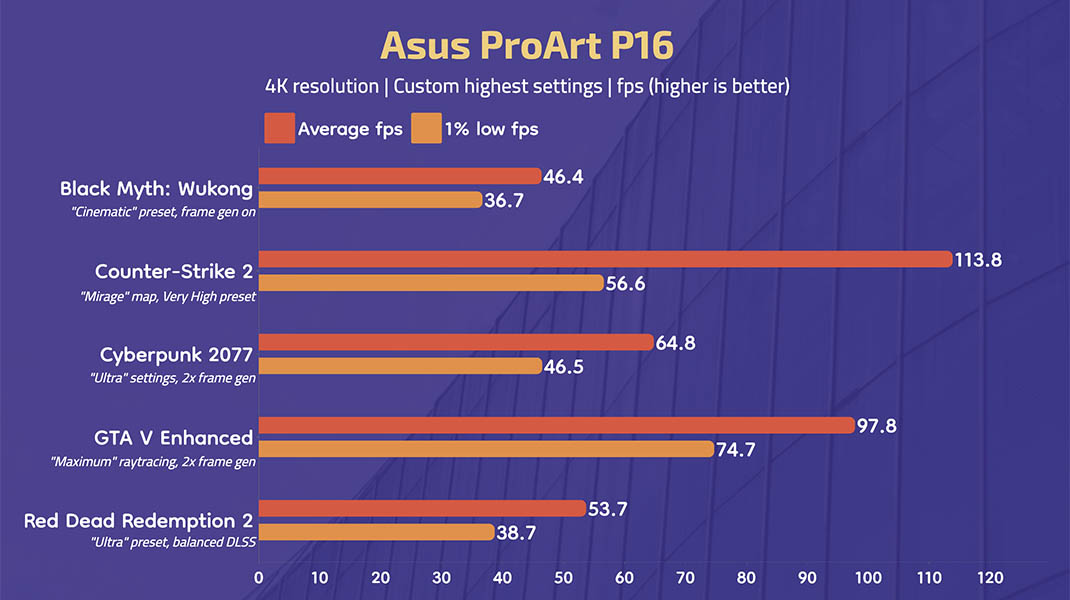
I’m pretty sure I would be straight-up cursed by the review Gods if I missed out on the opportunity to game on a motherflippin’ RTX 5090 laptop! So I fired up a few games… all at a glorious 4K resolution… and wow! I never realized how incredible 4K gaming really is. Especially when connected to a giant 4K display like the LG C1 55” OLED TV (review) we have at our office.
Display
- 16" glossy 4K OLED panel
- 120Hz refresh rate, 100% DCI-P3 color gamut
- 600 nits peak brightness
The display is another highlight of this Asus laptop. You’re looking at a giant 16” OLED panel with 4K resolution, 100% color accuracy, and 600+ nits of full-screen brightness.
I don’t even think I need to talk more about how awesome this screen is. But I will.
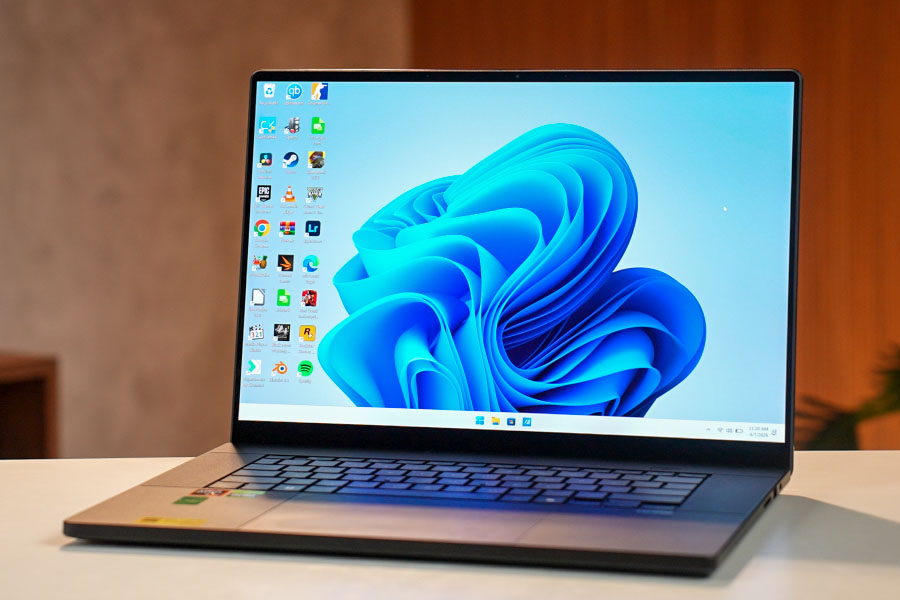
Because this is also a touchscreen, with a glossy finish to let all the colors pop. What’s interesting is that despite its glossy finish, Asus has also managed to apply some form of anti-reflection coating to make sure it’s not too distracting to look at when you have a lot of strong light sources around you. So yeah, from productivity to media consumption, the ProArt P16's display is perfect for everything.
Speakers
- 6 speakers with Dolby Atmos sound
And I know I’m always complaining about how Windows laptops have terrible speakers, but I gotta admit, the ProArt P16’s front-facing speakers are really something else. It does tend to sound a bit too shrill at full volume, although lowering it to around 80% gets you rich and detailed sound with fairly punchy bass, clear mids, and shimmery trebles.
Keyboard
- Backlit membrane keys (white backlight)
- 1.7mm key travel
The ProArt P16 gets all my love with its excellent keyboard as well. It has regular membrane keys (instead of mechanical ones), and its 1.7mm key travel feels incredibly satisfying to type on. The backlighting has been implemented pretty well, too. So all in all, an A+ keyboard.
Trackpad and webcam
- Glass trackpad (mechanical)
- 1080p camera with Windows Hello support
That said, there are exactly two things about the ProArt P16 that (for the lack of a better word) suck.

Including its trackpad and the webcam. I was expecting a haptic trackpad on something so expensive, but Asus has shipped a regular mechanical trackpad here. It still has a smooth glass surface and everything, but it gets absolutely clickmogged (oh God, what have I done?!) by the MacBook Neo (review) that’s literally 10x cheaper!
And while its Windows Hello-ready 1080p camera unlocks the laptop fast enough, I wouldn’t want to attend an online call from this webcam.
Asus ProArt P16 review: Conclusion
So that is all for my review of the Asus ProArt P16.
It was an extremely fun experience testing a 5090 laptop—but honestly—this beast is way above my pay grade. The perfect benchmark of an “overkill” for my personal use, if there ever was one. Yes, it’s powerful. Yes, it’s versatile. And yes, it’s not for everyone either.
So if you’ve been waiting for a laptop as powerful as this while simultaneously also being as portable as this, the Asus ProArt P16 doesn’t even have a competition. At least within the Windows ecosystem. Even Apple’s M5 Max doesn’t match the RTX 5090’s performance!
Asus ProArt P16 review: Pros and cons
| Pros | Cons |
| • A creator's dream machine | • Pricey af! |
| • RTX 5090 in such a slim profile is incredible! | • Gets a bit warm under stress |
| • A lovely 4K OLED display | • The port selection could've been better |
| • Great keyboard + surprisingly decent battery life |
- Watch our video review of the Asus ProArt P16
Article Last updated: May 27, 2026