
.gif)
Learn all the possible steps here.
By
Published Dec 22, 2025

No headings found
Nepal Telecom Corporation (NTC) has finally launched the much-anticipated eSIM service in the country. This state-owned telecom giant has signed an agreement with a UK-based company to provide eSIM services to its customers. In this post, we will be discussing the key features of eSIM and its implementation, and also discussing the process of how to get NTC eSIM in Nepal.

Nepal Telecom (NTC) eSIM Implementation:
What is an eSIM?
eSIM or Embedded SIM is a digital SIM that allows you to use cellular services from the telecom operator without having to use a physical SIM (Subscriber Identity Module) card. That means there’s no need to insert a physical card into the phone. Instead, the telco operator will remotely connect your device to their network and provide you with a mobile number and their services. Also, the information on an eSIM is rewritable, meaning you can decide to change your operator with a simple phone call. This technology is backed by GSMA, which has defined the standards for eSIM worldwide.
Advantages of eSIM:
- Easier to switch network operators
- Supports dual-SIM connectivity
- Takes up less space than traditional SIM cards
Disadvantages of eSIM:
- Switching between smartphones is tedious
- Can be comparatively easier to track
eSIM compatible phones
- Apple: iPhone XS, iPhone 11 Series, iPhone 12 Series, iPhone 13 Series, iPhone 14 series, iPhone 15 series, iPhone 16 series, iPhone 17 series
- Samsung: Galaxy S21 Series, Galaxy S22 Series, Galaxy S23 Series, Galaxy S24 Series, Galaxy S25 Series, Galaxy Note 20 FE, Galaxy Z Flip 3, Galaxy Z Fold 3, Galaxy Z Flip 4, Galaxy Z Fold 4, Galaxy Z Flip 5, Galaxy Z Fold 5
- Google: Pixel 4, Pixel 5, Pixel 6 series, Pixel 7 series, Pixel 8 series, Pixel 9 series, Pixel 10 series
eSIM implementation by Nepal Telecom (NTC)
Nepal Telecom is the first carrier to allow eSIM connection in Nepal. The telecom operator allocated a budget for the project in the fiscal year 2078/79 to deploy its own eSIM platform. Similarly, NTC signed an arrangement with Monty UK Global Limited in April 2022 to provide an eSIM platform to the company.

How to know if my phone supports eSIM?
Okay, before you get in line to upgrade to an eSIM, it's crucial to know whether your smartphone supports eSIM or not. The general rule of thumb is that if you have a relatively new flagship phone or tablet, then it might support eSIM. But to be really sure, simply dial "*#06#".
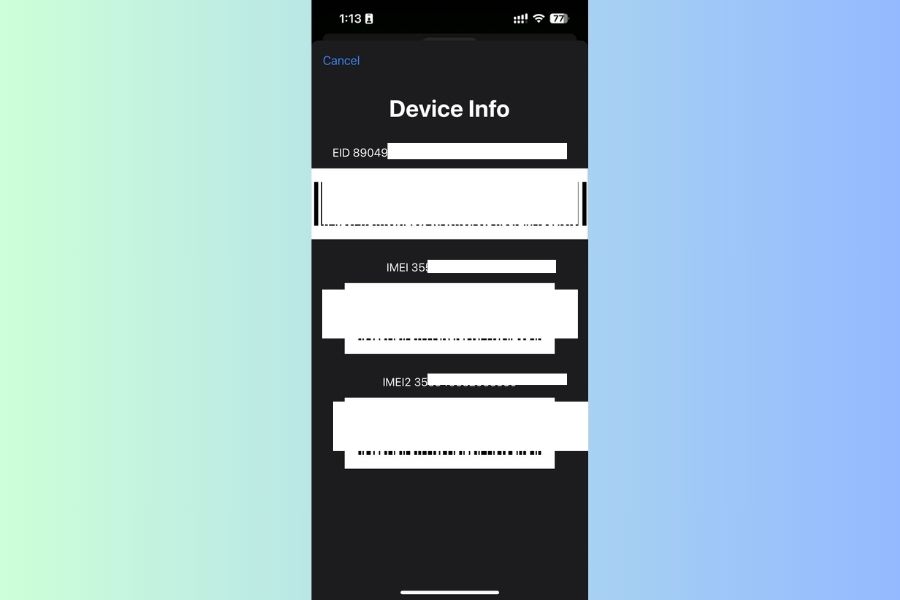
How to get NTC eSIM in Nepal?
- All existing prepaid and postpaid customers of NTC are eligible for the eSIM upgrade at a cost of 50 rupees.
- If you are looking to buy a new eSIM, it will bear the charge of a new physical SIM card; 90 rupees plus 50 rupees as an e-SIM conversion charge.
- You can get an eSIM online via the Nepal Telecom app or at any NTC office near your home.
- To do it online, all you need is to fill out a form, and then submit it with an original photo of the official document. Please note that you must have the document in hand; the app/website doesn't support uploading from the gallery.
- And you'll get a QR code sent to your email.
- If you have some spare time, you can visit the NTC office counter and submit the same form offline with a photocopy of your citizenship (both sides) attached. That's it.
An NT staff member will then activate the eSIM on your phone. The whole process takes like 3-5 minutes, provided that you're already at the front of the queue. You will also receive a piece of paper with a QR code, ICCID (Integrated Circuit Card ID) number, and an activation code in case you want to switch phones. However, if you revert to a physical SIM card, Nepal Telecom says you'll need to visit their office and complete a form to request it.
How to get a new NTC eSIM Via Khalti?
Popular digital wallet Khalti has made it very convenient to purchase a new NTC eSIM. Thanks to the partnership between Khalti and Nepal Telecom, you can buy a new NTC eSIM without stepping a foot outside. Yes, you heard that right! Here's how you can do it!
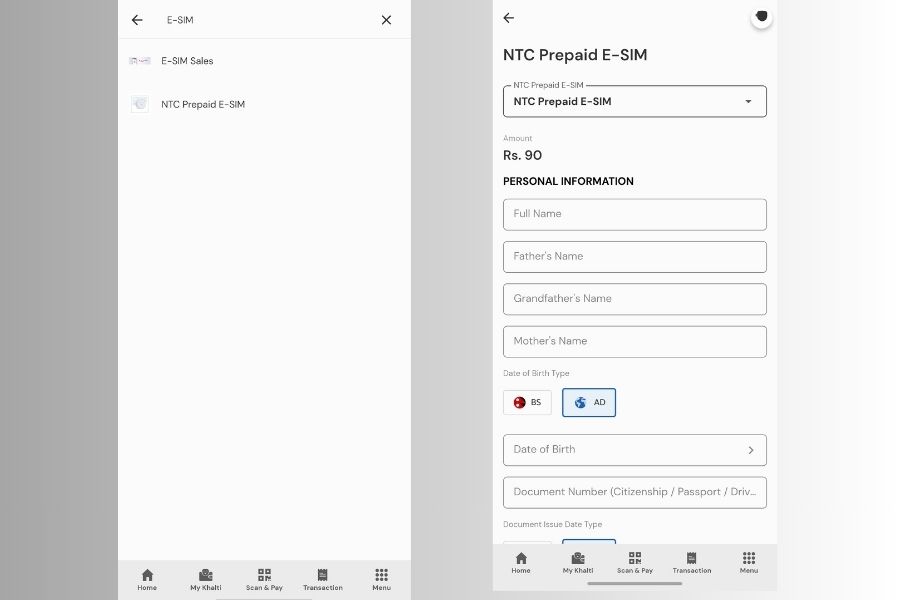
- Open your Khalti digital wallet.
- Search for E-SIM, and it will display the NTC Prepaid E-SIM option.
- Click on it and fill in all the info, such as Full Name, name of your father, grandfather, and mother, birth date.
- Then enter your Date of Birth and document number: Citizenship, Passport, Driving License, Voter ID, or National ID.
- After that, fill in the Document Issue Date and Permanent Address.
- Thenupload the front and back photos of your original document, along with your Live real-time Photo.
- Leave your contact number and email.
- Hit the purchase button, and Voila! All this will cost 90 rupees, which will be deducted from your Khalti account.
- Khalti will contact you via a representative within 24 hours.
How to set up eSIM on your phone?
- To set up an eSIM (whether you have an Android or iOS device), open up the Settings menu and search for “Add Mobile Plan” (Android) or “Add Cellular Plan” (iPhone).
- This option might have a different name depending on the Android smartphone manufacturer, but you should find it under the “SIM Card Manager” menu inside Settings.
- Now, you will get an option to scan a QR code with your eSIM profile. Just follow the on-screen instructions to customize the plan name if required. And voilà, your NTC eSIM is ready!
iPhone 14 / 15 / 16 / 17series purchased from the US will work in Nepal?
Apple announced the iPhone 14 Series with eSIM-only models for the US region, and the trend was followed with the iPhone 15 Series and iPhone 16 /17 Series as well. So users might be unsure whether US variants of the latest iPhones will work in Nepal. So, let's talk about it here. There are a few factors that influence the use of the latest iPhones in Nepal. First off, the Nepal Telecommunication Authority (NTA) has implemented its long-awaited Mobile Device Management System (MDMS) service since September 15, 2022. So any smartphone brought into Nepal from foreign countries—including the US—will now be considered grey or illegally imported devices if they're not registered under the system. And such devices will be effectively blocked from the network of all telecom operators in Nepal. But the entire MDMS thing has kinda gone back and forth with so-called full implementations to website crashing and whatnot! However, to be on the safe side, your iPhone must be registered under MDMS to use an eSIM in Nepal.

Some Frequently Asked Questions about NTC eSIM
How much do I have to pay for an NTC eSIM?
You'll need to pay 50 rupees to convert a physical SIM card to an eSIM. If you are getting a new eSIM number, you'll need to pay 140 rupees in total.
Is eSIM safe to use?
Yes, eSIM is completely safe to use.
Does eSIM function as a regular SIM card?
Yes, eSIM functions just as well as your regular physical SIM card.
Do I need to visit the NTC office for eSIM?
No, you can also do it online via the Nepal Telecom App to convert an existing SIM to an eSIM, or use Khalti to purchase a new eSIM. Or else, you can visit the NTC office for an eSIM, if that tickles your fancy.
- Watch: What is eSIM? Full process to get an eSIM in Nepal
Article Last updated: December 22, 2025


![Best Gaming Phones in Nepal [Updated 2026]](https://media.gadgetbytenepal.com/2025/11/Best-Gaming-Phones-in-Nepal.jpg)
![Best Premium Midrange Smartphones in Nepal [Updated 2026]](https://media.gadgetbytenepal.com/2025/11/Best-Premium-Midrange-Smartphones-in-Nepal-1.jpg)

![Best Mobile Phones Under Rs. 10,000 in Nepal [Updated 2026]](https://media.gadgetbytenepal.com/2025/11/delete-10k.jpg)